NUR 513 RS Navigating the Online Scaveneger Hunt LC5
Online Learning Environment Scavenger Hunt
Introduction
Learning how to navigate the online classroom environment is essential to your academic success. GCU’s L
...
NUR 513 RS Navigating the Online Scaveneger Hunt LC5
Online Learning Environment Scavenger Hunt
Introduction
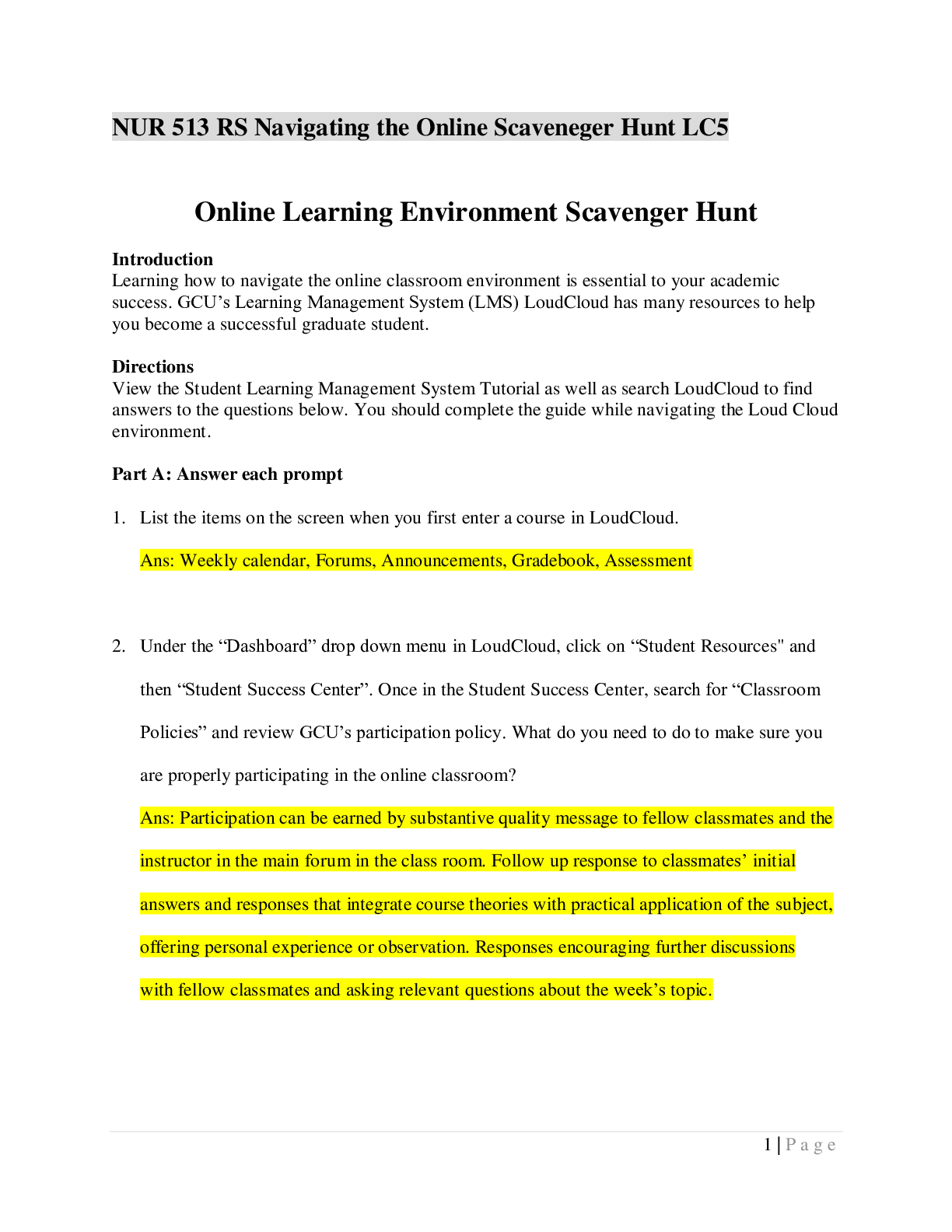
Learning how to navigate the online classroom environment is essential to your academic success. GCU’s Learning Management System (LMS) LoudCloud has many resources to help you become a successful graduate student.
Directions
View the Student Learning Management System Tutorial as well as search LoudCloud to find answers to the questions below. You should complete the guide while navigating the Loud Cloud environment.
Part A: Answer each prompt
1. List the items on the screen when you first enter a course in LoudCloud.
2. Under the “Dashboard” drop down menu in LoudCloud, click on “Student Resources" and then “Student Success Center”. Once in the Student Success Center, search for “Classroom Policies” and review GCU’s participation policy. What do you need to do to make sure you are properly participating in the online classroom?
3. Under the “Dashboard” drop down menu in LoudCloud, click on “Student Resources" and then “Student Success Center”. Once in the Student Success Center, search for “Style Guides and Templates” and review the APA Style Guide and APA Template (without Abstract) documents. Why do you think academic writing requires such strict formatting?
4. Navigate to the “Student Success Center." Under which section in the Student Success Center can you find official Microsoft Tutorials for their software products?
5. Navigate to the “Student Success Center." Click on “Resources” and under the “Tools” heading, click on “New Student Success”. Locate “Tutorials and Webinars”. Which “Classroom Success” tutorial or webinar do you think might be most helpful for you?
6. From the course home page in LoudCloud, find where you can see your current grade in the course.
7. Click on “Path” from the drop down menu in the classroom. What are all the different sections found in the Syllabus? Course name, course description, course materials.
8. Click on “Library” under the “Student Resources” tab from the dashboard drop down. Find a time that a GCU Library Introduction webinar tour is available. Write down a time and date that one is offered.
Part B: Highlight the correct response
9. Where are the topic lectures found?
10. From the Resources page of the Student Success Center, which of the following is not found under the “Explore Tools” link?
11. What do Study Materials in Loud Cloud consist of?
12. Where do you find “Announcements" for a course in LoudCloud?
13. What would you do if you wanted to ask your instructor a question in which you felt your classmates could benefit from the answer as well?
14. Looking at the Forums section of your LoudCloud classroom, which section is not listed?
15. Where are the weekly topic learning objectives found?
16. Where is the syllabus found in Loud Cloud?
NUR 513 RS Navigating the Online Scaveneger Hunt LC5
Online Learning Environment Scavenger Hunt
Introduction
Learning how to navigate the online classroom environment is essential to your academic success. GCU’s Learning Management System (LMS) LoudCloud has many resources to help you become a successful graduate student.
Directions
View the Student Learning Management System Tutorial as well as search LoudCloud to find answers to the questions below. You should complete the guide while navigating the Loud Cloud environment.
Part A: Answer each prompt
1. List the items on the screen when you first enter a course in LoudCloud.
2. Under the “Dashboard” drop down menu in LoudCloud, click on “Student Resources" and then “Student Success Center”. Once in the Student Success Center, search for “Classroom Policies” and review GCU’s participation policy. What do you need to do to make sure you are properly participating in the online classroom?
3. Under the “Dashboard” drop down menu in LoudCloud, click on “Student Resources" and then “Student Success Center”. Once in the Student Success Center, search for “Style Guides and Templates” and review the APA Style Guide and APA Template (without Abstract) documents. Why do you think academic writing requires such strict formatting?
4. Navigate to the “Student Success Center." Under which section in the Student Success Center can you find official Microsoft Tutorials for their software products?
5. Navigate to the “Student Success Center." Click on “Resources” and under the “Tools” heading, click on “New Student Success”. Locate “Tutorials and Webinars”. Which “Classroom Success” tutorial or webinar do you think might be most helpful for you?
6. From the course home page in LoudCloud, find where you can see your current grade in the course.
7. Click on “Path” from the drop down menu in the classroom. What are all the different sections found in the Syllabus? Course name, course description, course materials.
8. Click on “Library” under the “Student Resources” tab from the dashboard drop down. Find a time that a GCU Library Introduction webinar tour is available. Write down a time and date that one is offered.
Part B: Highlight the correct response
9. Where are the topic lectures found?
10. From the Resources page of the Student Success Center, which of the following is not found under the “Explore Tools” link?
11. What do Study Materials in Loud Cloud consist of?
12. Where do you find “Announcements" for a course in LoudCloud?
13. What would you do if you wanted to ask your instructor a question in which you felt your classmates could benefit from the answer as well?
14. Looking at the Forums section of your LoudCloud classroom, which section is not listed?
15. Where are the weekly topic learning objectives found?
16. Where is the syllabus found in Loud Cloud?
[Show More]