AP-204
Exam Practice Questions
This AP-204 exam PDF provides detailed practice questions, answers, and
explanations. These Salesforce AP-204 exam practice questions are designed
for IT professionals, system administr
...
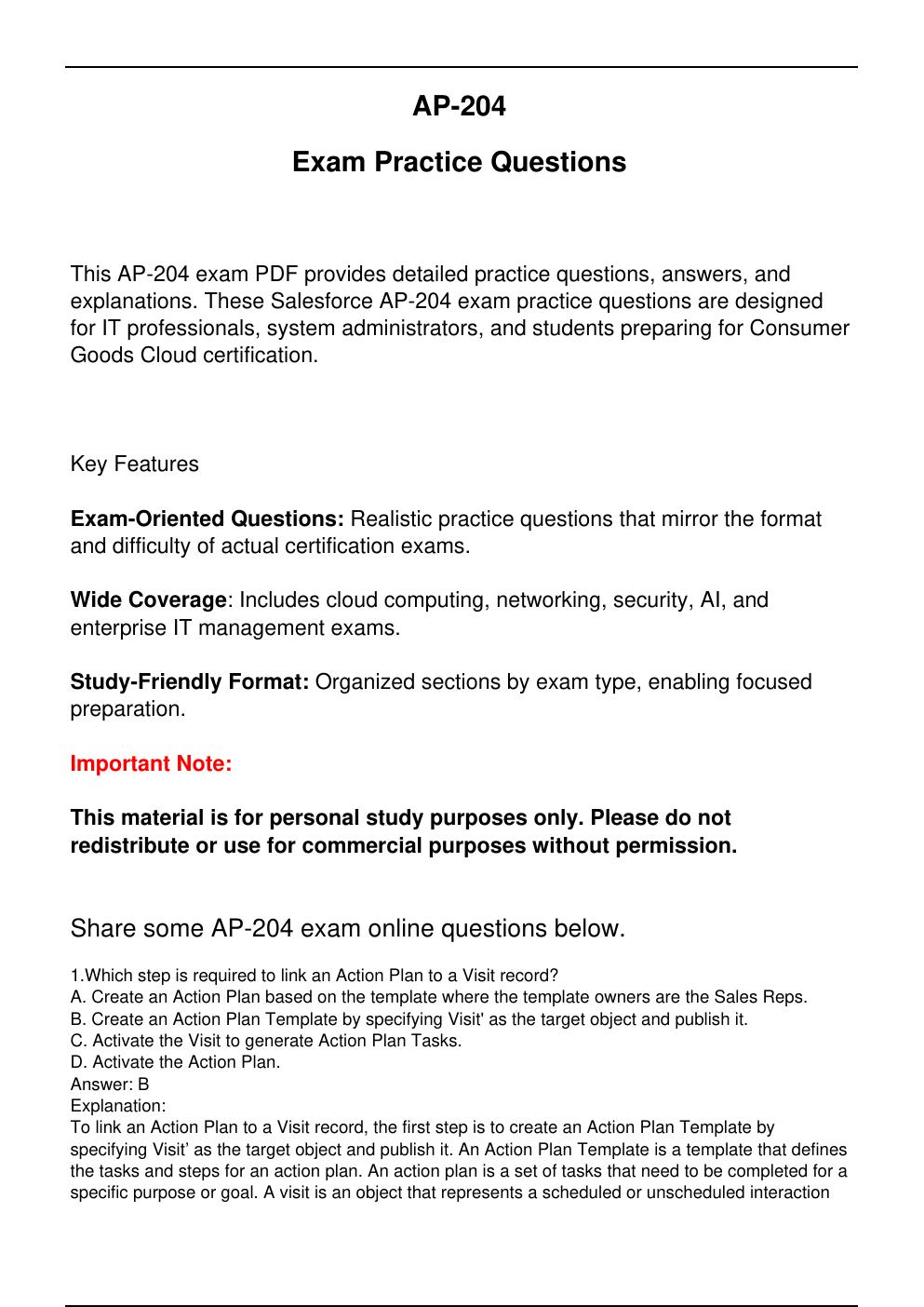
AP-204
Exam Practice Questions
This AP-204 exam PDF provides detailed practice questions, answers, and
explanations. These Salesforce AP-204 exam practice questions are designed
for IT professionals, system administrators, and students preparing for Consumer
Goods Cloud certification.
Key Features
Exam-Oriented Questions: Realistic practice questions that mirror the format
and difficulty of actual certification exams.
Wide Coverage: Includes cloud computing, networking, security, AI, and
enterprise IT management exams.
Study-Friendly Format: Organized sections by exam type, enabling focused
preparation.
Important Note:
This material is for personal study purposes only. Please do not
redistribute or use for commercial purposes without permission.
Share some AP-204 exam online questions below.
1.Which step is required to link an Action Plan to a Visit record?
A. Create an Action Plan based on the template where the template owners are the Sales Reps.
B. Create an Action Plan Template by specifying Visit' as the target object and publish it.
C. Activate the Visit to generate Action Plan Tasks.
D. Activate the Action Plan.
Answer: B
Explanation:
To link an Action Plan to a Visit record, the first step is to create an Action Plan Template by
specifying Visit’ as the target object and publish it. An Action Plan Template is a template that defines
the tasks and steps for an action plan. An action plan is a set of tasks that need to be completed for a
specific purpose or goal. A visit is an object that represents a scheduled or unscheduled interaction
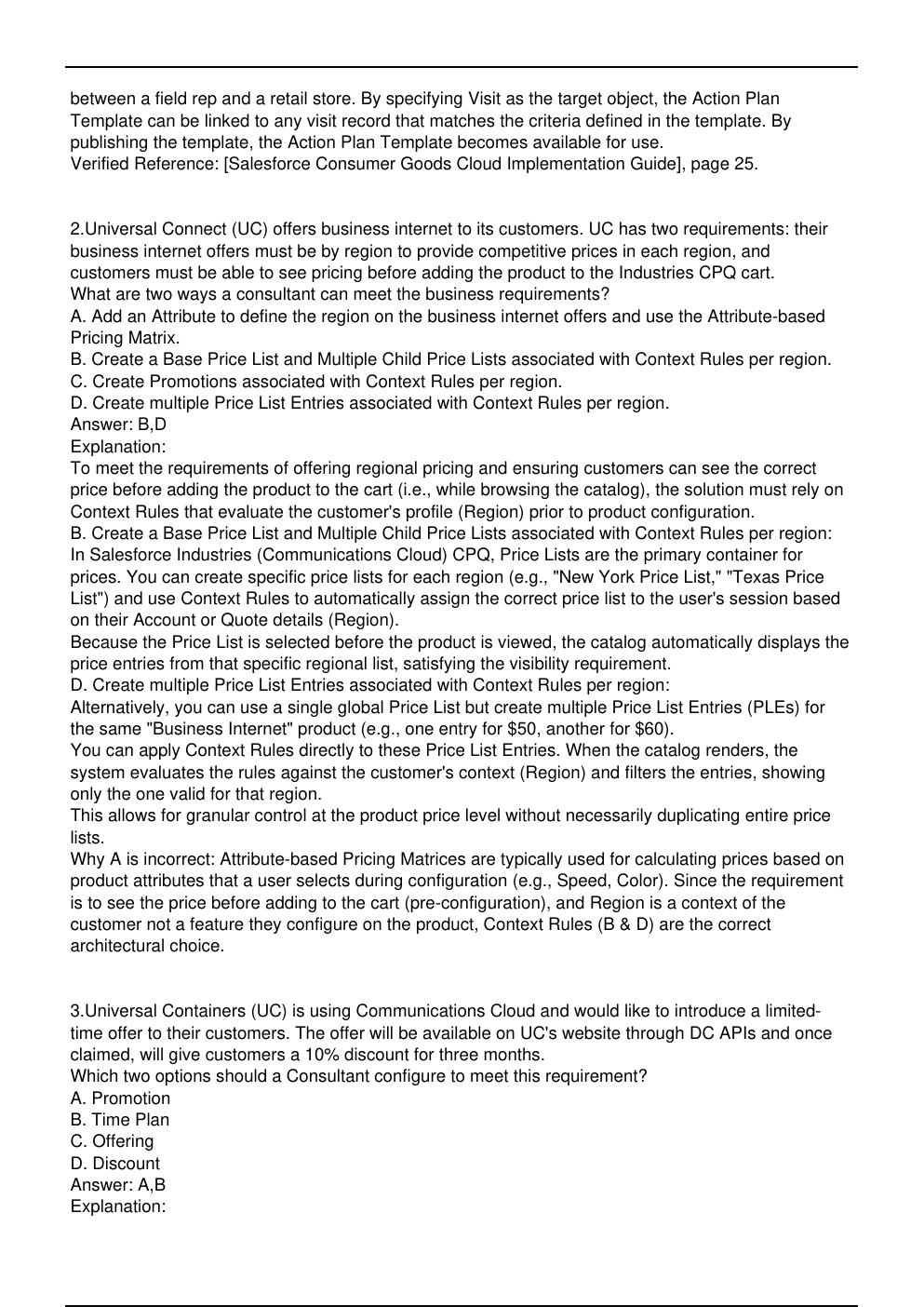
between a field rep and a retail store. By specifying Visit as the target object, the Action Plan
Template can be linked to any visit record that matches the criteria defined in the template. By
publishing the template, the Action Plan Template becomes available for use.
Verified Reference: [Salesforce Consumer Goods Cloud Implementation Guide], page 25.
2.Universal Connect (UC) offers business internet to its customers. UC has two requirements: their
business internet offers must be by region to provide competitive prices in each region, and
customers must be able to see pricing before adding the product to the Industries CPQ cart.
What are two ways a consultant can meet the business requirements?
A. Add an Attribute to define the region on the business internet offers and use the Attribute-based
Pricing Matrix.
B. Create a Base Price List and Multiple Child Price Lists associated with Context Rules per region.
C. Create Promotions associated with Context Rules per region.
D. Create multiple Price List Entries associated with Context Rules per region.
Answer: B,D
Explanation:
To meet the requirements of offering regional pricing and ensuring customers can see the correct
price before adding the product to the cart (i.e., while browsing the catalog), the solution must rely on
Context Rules that evaluate the customer's profile (Region) prior to product configuration.
B. Create a Base Price List and Multiple Child Price Lists associated with Context Rules per region:
In Salesforce Industries (Communications Cloud) CPQ, Price Lists are the primary container for
prices. You can create specific price lists for each region (e.g., "New York Price List," "Texas Price
List") and use Context Rules to automatically assign the correct price list to the user's session based
on their Account or Quote details (Region).
Because the Price List is selected before the product is viewed, the catalog automatically displays the
price entries from that specific regional list, satisfying the visibility requirement.
D. Create multiple Price List Entries associated with Context Rules per region:
Alternatively, you can use a single global Price List but create multiple Price List Entries (PLEs) for
the same "Business Internet" product (e.g., one entry for $50, another for $60).
You can apply Context Rules directly to these Price List Entries. When the catalog renders, the
system evaluates the rules against the customer's context (Region) and filters the entries, showing
only the one valid for that region.
This allows for granular control at the product price level without necessarily duplicating entire price
lists.
Why A is incorrect: Attribute-based Pricing Matrices are typically used for calculating prices based on
product attributes that a user selects during configuration (e.g., Speed, Color). Since the requirement
is to see the price before adding to the cart (pre-configuration), and Region is a context of the
customer not a feature they configure on the product, Context Rules (B & D) are the correct
architectural choice.
[Show More]




![Preview of eBook [PDF] Advanced Technologies for Rechargeable Batteries Metal Ion, Hybrid, and Metal-](https://browseimages.nyc3.digitaloceanspaces.com/paper-images/2024/Aug/31/4CeOA98s2024-08-31-08-3766d2ac249f11f.png)
![Preview of eBook [PDF] Digital Personality A Man Forever Volume 2 Technical Aspects 1st Edition By Ku](https://browseimages.nyc3.digitaloceanspaces.com/paper-images/2024/Aug/30/t3vEGYrg2024-08-30-02-3166d1adaa38427.png)