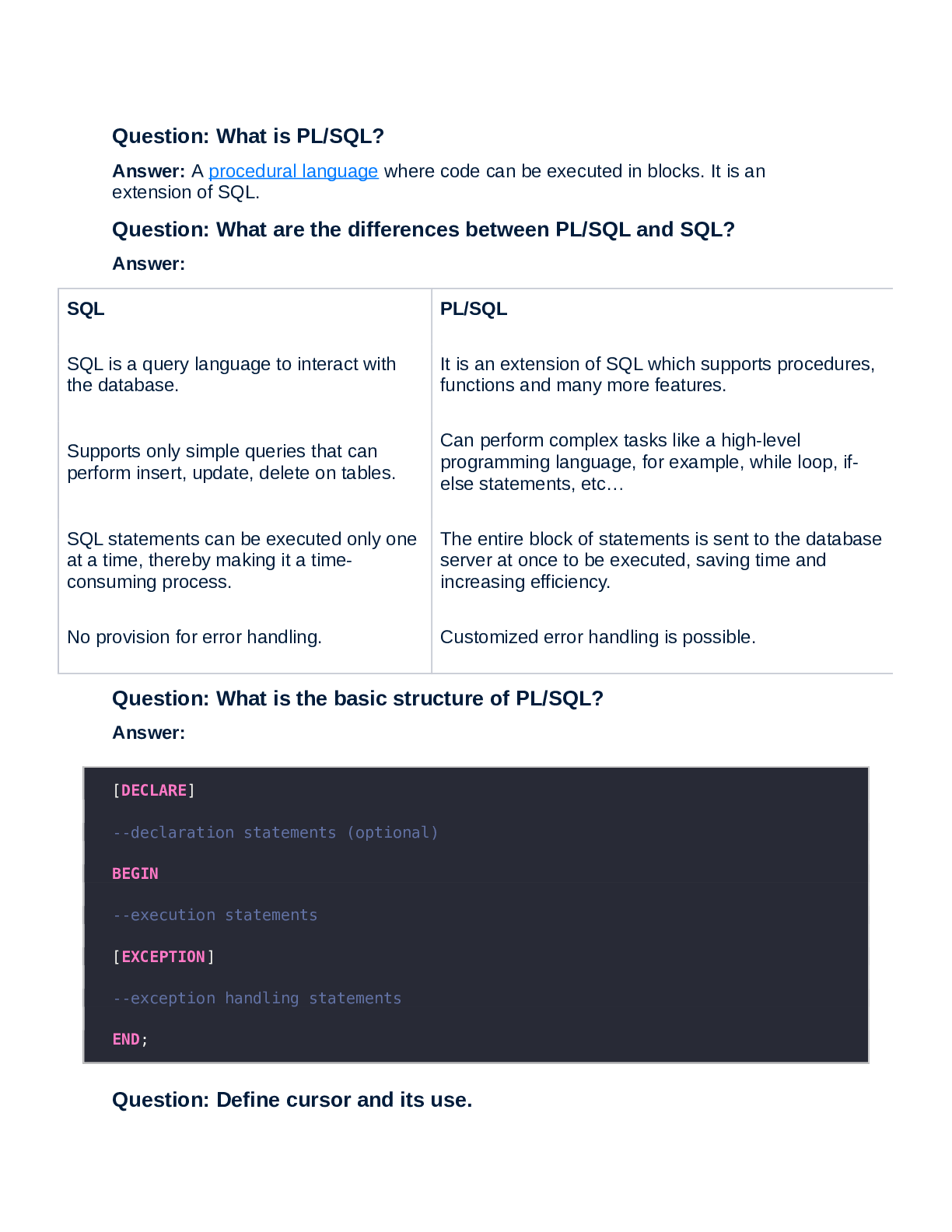
Question: What is PL/SQL?
Answer: A procedural language where code can be executed in blocks. It is an
extension of SQL.
Question: What are the differences between PL/SQL and SQL?
Answer:
SQL PL/SQL
SQL is a query
...
Question: What is PL/SQL?
Answer: A procedural language where code can be executed in blocks. It is an
extension of SQL.
Question: What are the differences between PL/SQL and SQL?
Answer:
SQL PL/SQL
SQL is a query language to interact with
the database.
It is an extension of SQL which supports procedures,
functions and many more features.
Supports only simple queries that can
perform insert, update, delete on tables.
Can perform complex tasks like a high-level
programming language, for example, while loop, ifelse statements, etc…
SQL statements can be executed only one
at a time, thereby making it a timeconsuming process.
The entire block of statements is sent to the database
server at once to be executed, saving time and
increasing efficiency.
No provision for error handling. Customized error handling is possible.
Question: What is the basic structure of PL/SQL?
Answer:
[DECLARE]
--declaration statements (optional)
BEGIN
--execution statements
[EXCEPTION]
--exception handling statements
END;
Question: Define cursor and its use.Answer: A cursor is a pointer to a memory area assigned by Oracle to process SQL
statements. The cursor is used to hold records returned by the SQL query. There are 2
types of cursors – implicit and explicit.
Question: Why do we use database triggers? Give the syntax of a
trigger.
Answer: The trigger is a stored procedure that is automatically invoked when an event
happens. The event could be: insert, update, delete, etc… Syntax –
create trigger [trigger_name]
[before | after]
on [table_name]
[for each row]
[trigger_body]
Question: How do you compile PL/SQL code?
Answer: Firstly, the syntax check is performed. When the developer corrects any
syntax errors, Oracle binds all the variables holding data with a storage address. Finally,
the p-code generation process takes place.
Question: Explain exception handling in PL/SQL.
Answer: PL/SQL offers customized exception handling. When an error occurs, an error
handling code is included in the program itself. There are 3 types of exceptions –
Pre-defined exceptions – common errors that are already defined. Example –
NO_DATA_FOUND
Undefined exceptions – the errors that do not have predefined names.
User-defined exceptions – handled by the code written by the user.
Question: Tell about a few data types in PL/SQL.
Answer: There are many data types –
Scalar types – primitive data types like CHAR, DATE, LONG, VARCHAR2 etc…
Composite – these are made up of other data types and can be easily updated.
Example, RECORD, TABLE etc…
Reference data types like CURSOR
Large object types – BLOB, CLOB etc…Question: What is the difference between %TYPE and %ROWTYPE?
Give an example.
Answer:
%TYPE %ROWTYPE
The attribute that declares a variable
of the same data type as of a table
column.
The attribute that declares a variable of type RECORD
having the same structure as a table row. The row is the
RECORD that contains fields having the same data
types and names as the columns of a table or view.
Example –
DECLARE
studentId
students.student_id%TYPE;
Example –
DECLARE
stud_rec
students.%ROWTYPE;
Question: What constitutes a PL/SQL package?
Answer: Packages are schema objects that place functions, procedures, variables,
etc… in one place. Packages should have –
Package specifications
Package body
Question: List some schema objects that are created using PL/SQL.
Answer: Database links, triggers, stored procedures, functions and packages, views,
synonyms, external procedure libraries, sequences, etc…
Check here: Basic SQL Commands Checklist
Question: What are the various predefined exceptions?
Answer: Predefined exceptions are internally defined exceptions that occur during the
execution of a program. For example, PL/SQL raises NO_DATA_FOUND when there
are no rows returned upon a select operation, and if more than one row is returned
using a select statement, TOO_MANY_ROWS error is generated. Some more
examples:
COLLECTION_IS_NULL: when a collection is null
CURSOR_ALREADY_OPEN: When a cursor is already open LOGIN_DENIED: When login is incorrect or permission is not there
For the complete list of predefined exceptions, check out Oracle docs.
Question: What is the difference between syntax and runtime errors?
Answer:
Syntax error Runtime error
These are compile-time errors
found by the compiler.
These are not detected by the compiler and cause the
program to give an incorrect result.
The code doesn't build and run until
these issues are resolved.
The code is compiled and run, and if an error occurs, the
program stops halfway.
Some examples are missing
semicolons or brackets (;, {}),
incorrect spelling of classes,
keywords etc.
Examples are null pointer exceptions, dividing a number by
zero, array index out of bounds, etc.
int x = 9 String name = null; In the
first line, a semicolon is missing
which the compiler will catch
String name = null; if(name.equals(“hackr.io”)){….} Since
name is null, the exception will be caught during runtime
when the code is executed
Question: What are the various packages available for PL-SQL
Developers?
Answer: The several packages available for PL/SQL developers are:
DBMS_ALERT alert an application using triggers when particular database values change. The
alerts are transaction-based and asynchronous.
DBMS_OUTPUT display output from PL/SQL blocks, packages, subprograms and triggers.
Mostly used for displaying PL/SQL debugging information.
DBMS_PIPE
different sessions communicate over named pipes using this package. The
procedures PACK_MESSAGE and SEND_MESSAGE pack a message into a
pipe, then send it to another session.
HTF and HTP allow PL/SQL programs to generate HTML tags.UTL_FILE lets PL/SQL programs read and write OS text files.
UTL_HTTP
allows your PL/SQL programs to make hypertext transfer protocol (HTTP)
callouts. The package has two entry points, each of which accepts a URL
(uniform resource locator) string, contacts the specified site, and returns the
requested data, which is usually in HTML format.
UTL_SMTP allows PL/SQL programs to send emails over SMTP.
Question: Explain Character Functions?
Answer: Character functions are functions that manipulate character data. These are
more popularly called as string functions. Example:
LEFT
Returns the mentioned number of characters
from left of a string. LEFT(value, NoOfChars).
Example
LEFT('Hackr', 4) will give Hack.
RIGHT return specified number of characters from right.
RIGHT(value, NoOfChars). Example RIGHT('banker', 2) will return er.
SUBSTRING
selects data from any part of the string.
SUBSTRING(value, StartPosition, NoOfChars).
Example
SUBSTRING('hackr.io',0,4) will
return hackr.
LTRIM trims white spaces from the left. Example LTRIM(' hackr.io') will return
hackr.io.
RTRIM trims white spaces from the right. Example RTRIM('hackr.io ') will return
hackr.io.
UPPER converts all the characters to uppercase.
Example
UPPER('hackr.io') returns
HACKR.IO.
LOWER converts all the characters to lowercase. LOWER('HACKR.IO') returnsExample hackr.io.
Question: What is the use of SYSDATE and USER keywords? Explain
with examples.
Answer: SYSDATE: returns the current date and time on the local database server.
The syntax is SYSDATE. If we have to extract part of the date, then we use the
TO_CHAR function. Examples:
SELECT SYSDATE FROM dual;
select customer_id, TO_CHAR(SYSDATE, 'yyyy/mm/dd') from customer where
customer_id < 200;
USER: USER returns the user_id of the current session.
Example:
select USER from dual;
Question: What is the difference between SGA and PGA?
Answer:
SGA PGA
System Global Area Program Global Area
Contains data and control information for one
Oracle database instance
Contains data and control information exclusively
for a single Oracle process
Shared memory region for components Non-shared memory region
example: cached data blocks and SQL areas Example: session memory, SQL work area
Question: Explain the uses of Merge with Syntax in PL-SQL.
Answer: Merge reduces the number of table scans and performs parallel operations if
required. MERGE inserts or updates data conditionally from one table to another. For
example
[Show More]

.png)