Design and Technology > QUESTIONS & ANSWERS > Adobe Photoshop CC Exam Practice Questions – COMPLETE SOLUTIONS (All)
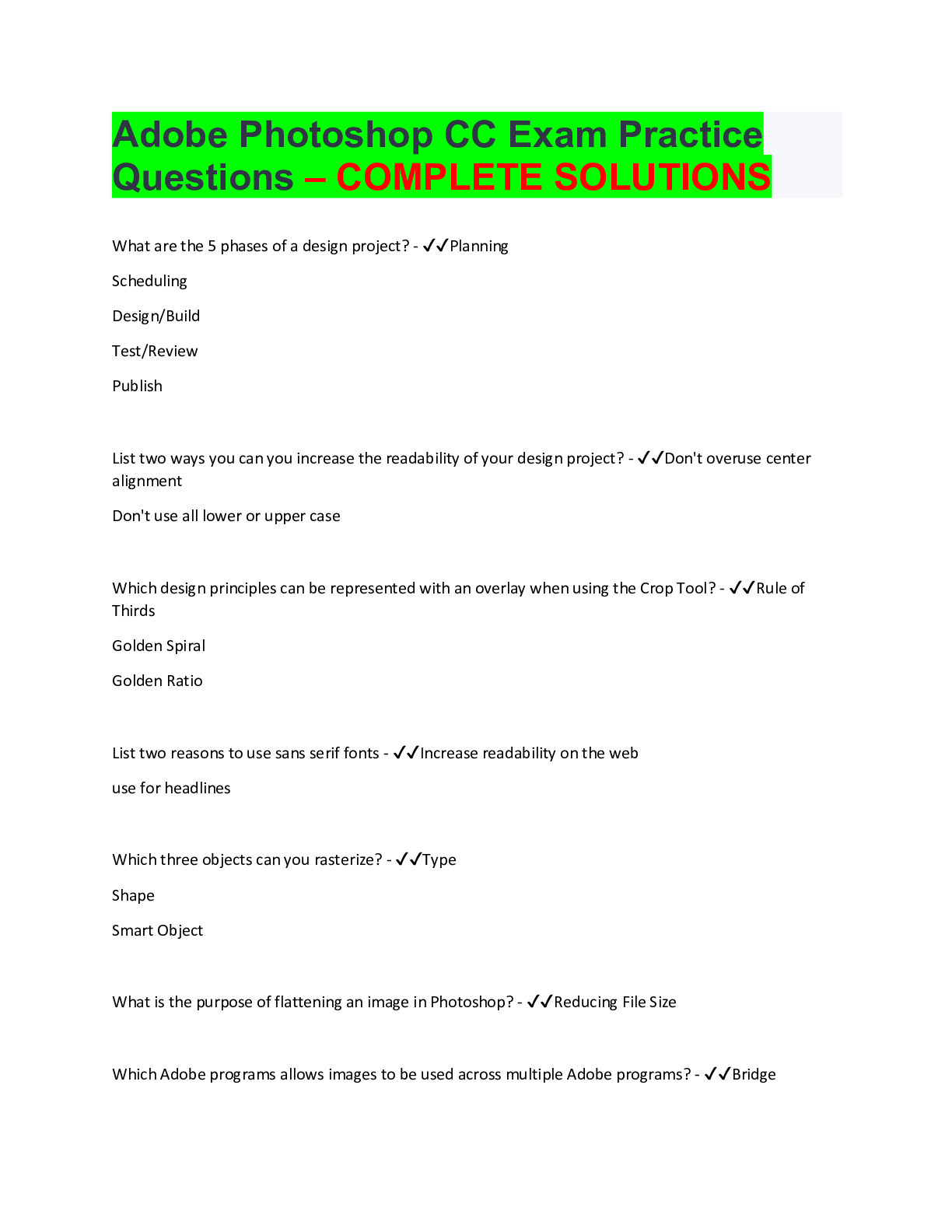
Adobe Photoshop CC Exam Practice Questions – COMPLETE SOLUTIONS What are the 5 phases of a design project? - ✔✔Planning Scheduling Design/Build Test/Review Publish List two ways you can y ... ou increase the readability of your design project? - ✔✔Don't overuse center alignment Don't use all lower or upper case Which design principles can be represented with an overlay when using the Crop Tool? - ✔✔Rule of Thirds Golden Spiral Golden Ratio List two reasons to use sans serif fonts - ✔✔Increase readability on the web use for headlines Which three objects can you rasterize? - ✔✔Type Shape Smart Object What is the purpose of flattening an image in Photoshop? - ✔✔Reducing File Size Which Adobe programs allows images to be used across multiple Adobe programs? - ✔✔BridgeHow do you auto-blend two layers to fill in any extra space? - ✔✔Select both layers EDIT > AUTO BLEND LAYERS How do you rotate an image 90 degrees clockwise? - ✔✔IMAGE> IMAGE ROTATION Select 90 degrees clockwise Which Adobe programs allows a user to create a photo gallery web page? - ✔✔Bridge How do you export paths to Illustrator? - ✔✔FILE > EXPORT > PATHS TO ILLUSTRATOR What is the maximum amount of colors in an indexed image? - ✔✔256 What is the purpose of framing an object in your design and how can you do it? - ✔✔To draw the viewer's eyes to a specific area and it can be done by editing the contrast/brightness to give a certain area emphasis; or you can crop to draw the viewer's eyes to a particular area in design Where in menu to you go to SKEW an image? - ✔✔EDIT > TRANSFORM > SKEW How do you add warming and cooling filter? - ✔✔Use PHOTO FILTER Adjustment layer Name two image types that are NON-LOSSY. - ✔✔TIFF and PNG Name an image type that is LOSSY. - ✔✔JPG How do you apply a filter to TYPE and still retain the edit-ability of the text? - ✔✔Convert it to a Smart Object first How to you create JPGs, GIFs, and PNGs out of an existing PSD file? - ✔✔FILE > EXPORT > SAVE FOR WEBWhat menu do you use to turn on/off SNAP TO GRID? - ✔✔VIEW What menu do you use to create/clear GUIDES? - ✔✔VIEW How do you turn off CONSTRAIN PROPORTIONS? - ✔✔Click the chain link icon to turn it off How do you AUTO ALIGN LAYERS? - ✔✔Select the layers and go to EDIT > AUTO ALIGN LAYERS How do you remove a color stop from a gradient? - ✔✔Drag the color stop down and it will delete How do you use CONTENT AWARE FILL to remove something distracting from a picture? - ✔✔Use LASSO tool to make a loose selection or what you want to remove and go to EDIT > FILL > CONTENT AWARE When exporting an image for the web, what file type will retain the transparency of the image? - ✔✔PNG-24 How do you STRAIGHTEN and CROP an image? - ✔✔Select CROP tool and locate STRAIGHTEN button on OPTION bar and drag the straighten tool along the line you want to straighten and then click check mark to CROP What menu do you use to change the overall preferences of Photoshop? - ✔✔EDIT > PREFERENCES Which font type is better for online reading? - ✔✔Sans Serif Which font type is better for reading printed material? - ✔✔Serif What happens when you use the FILE > PLACE command? - ✔ [Show More]
Last updated: 3 years ago
Preview 1 out of 6 pages
Buy this document to get the full access instantly
Instant Download Access after purchase
Buy NowInstant download
We Accept:
Can't find what you want? Try our AI powered Search
Connected school, study & course
About the document
Uploaded On
Sep 04, 2022
Number of pages
6
Written in
All
This document has been written for:
Uploaded
Sep 04, 2022
Downloads
0
Views
205
Scholarfriends.com Online Platform by Browsegrades Inc. 651N South Broad St, Middletown DE. United States.
We're available through e-mail, Twitter, Facebook, and live chat.
FAQ
Questions? Leave a message!
Copyright © Scholarfriends · High quality services·