Database Management  >  QUESTIONS & ANSWERS  >  WGU c170 Database Applications Labs With complete Solution (All)

WGU c170 Database Applications Labs With complete Solution

Document Content and Description Below

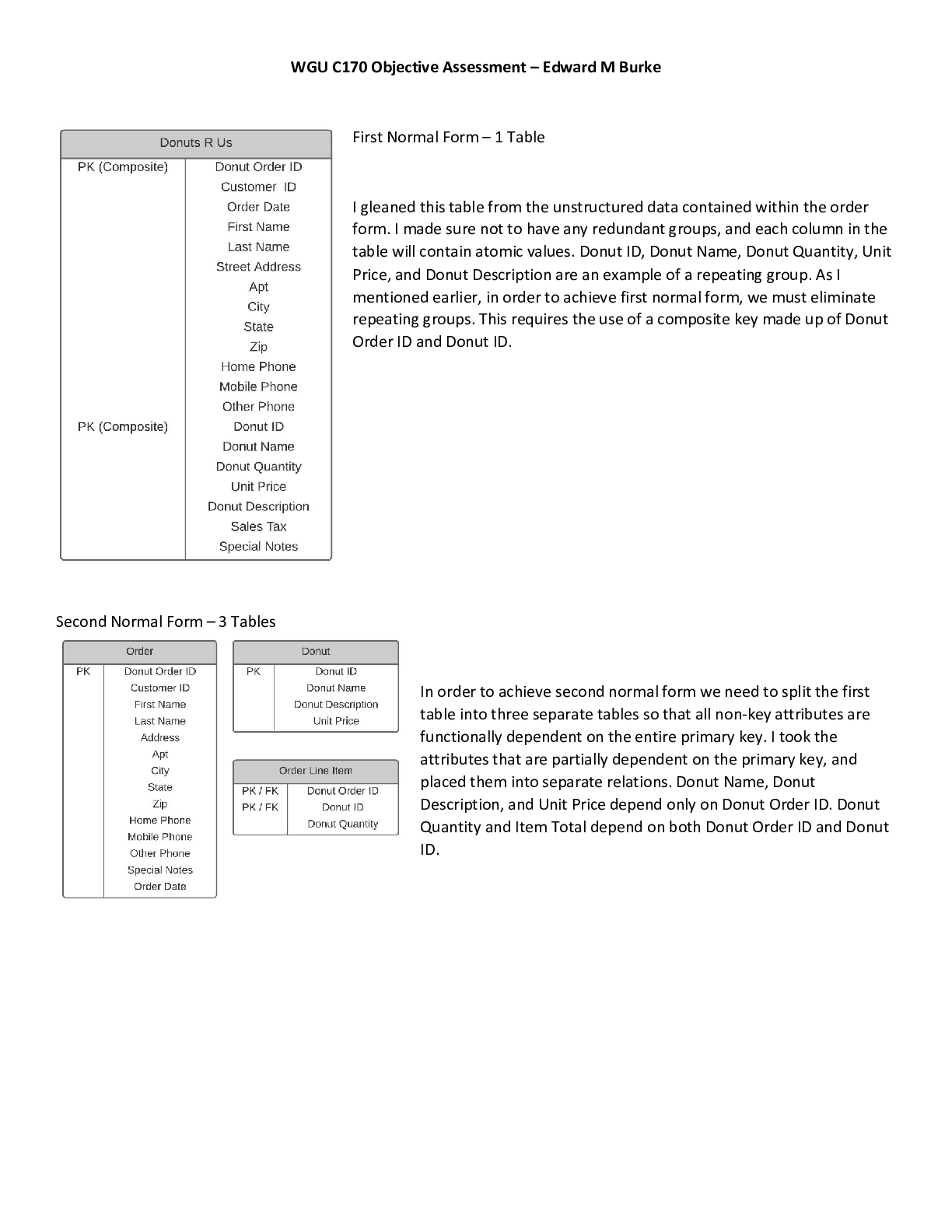
 Normalizing a dataset  Creating an E-R Diagram  Writing CREATE TABLE statements - establishing primary and foreign keys  Establishing relationships between entities with the FOREIGN KE ... Y REFERENCE statement  INSERTING data into tables (including multi-row INSERT statements)  Using the CONCAT function  Using aliases for table names LAB 3 - CREATE MYSQL CONNECTION You are required to take the following steps to accomplish the task: 1. On the MySQL Workbench Home window, click the [+] icon next to MySQL Connections. This opens the Setup New Connection wizard. 2. Define the Connection Name value as MyFirstConnection. 3. Ensure that Connection Method is set as Standard (TCP/IP). 4. Click the OK button to create the new MySQL connection. LAB 4 - CREATE DB ‘NAME’ You are required to take the following steps to accomplish the task: 1. Go to the Database menu. 2. Select Connect to Database. 3. Ensure that Stored Connection is set as Myconnection. 4. Ensure that Connection Method is set as Standard (TCP/IP). 5. Click the OK button. 6. Write the following query on the SQL Editor window: CREATE DATABASE PizzaOrderingDB; 7. Click the Execute button on the top of the SQL Editor window to execute the query. LAB 5 – CREATE A NEW MODEL (SCHEMA) Physical Schema rename to pizzaorderingdb This study source was downloaded by 100000831988016 from CourseHero.com on 05-12-2022 14:15:18 GMT -05:00 https://www.coursehero.com/file/49630109/Database-Management-Applications-Labsdocx/ You are required to take the following steps to accomplish the task: 1. Click File > New Model. A model can contain multiple schemata. Note that when you create a new model, it contains the mydb schema by default. 2. On the Physical Schemas toolbar, click the Add button to add a new schema. 3. In the tabsheet, change the name of the schema to pizzaorderingdb. Ensure that this change is reflected on the Physical Schemata tab. LAB 6 – CREATE AN ER DIAGRAM You are required to take the following steps to accomplish the task: 1. Go to the File menu. 2. Select the Open Model option. 3. Choose model and click the Open button. 4. Go to the Model menu. 5. Select the Create Diagram from Catalog Objects option. 6. Select 1:n Non-Identifying relationship . 7. Select the PizzaOrder table and then select the Customer table to add a foreign key between them. 8. Select 1:n Non-Identifying relationship . 9. Select the PizzaOrder table and then select the Pizza table to add a foreign key between them. LAB 7 – CREATE TABLES IN MYSQL WORKBENCH ENVIRONMENT You are required to take the following steps to accomplish the task: 1. Go to the Database menu. 2. Select Connect to Database. 3. Ensure that Stored Connection is set as Myconnection. 4. Ensure that Connection Method is set as Standard (TCP/IP). 5. Click the OK button. 6. Write the following query on the SQL Editor window: CREATE TABLE Pizza ( PizzaID INT(11) NOT NULL AUTO_INCREMENT PRIMARY KEY, PizzaName VARCHAR(50) NOT NULL, This study source was downloaded by 100000831988016 from CourseHero.com on 05-12-2022 14:15:18 GMT -05:00 https://www.coursehero.com/file/49630109/Database-Management-Applications-Labsdocx/ PizzaDescription VARCHAR(250) NOT NULL, PizzaSize VARCHAR(10) NOT NULL, PizzaPrice DECIMAL(8,2) NOT NULL, PizzaPhotoID VARCHAR(200) NOT NULL ); 7. Click the Execute button on t [Show More]

Last updated: 3 years ago

Preview 1 out of 8 pages

Buy Now

Instant download

We Accept:

Payment methods accepted on Scholarfriends (We Accept)
Preview image of WGU c170 Database Applications Labs With complete Solution document

Buy this document to get the full access instantly

Instant Download Access after purchase

Buy Now

Instant download

We Accept:

Payment methods accepted on Scholarfriends (We Accept)

Also available in bundle (1)

Click Below to Access Bundle(s)

WGU c170 Bundled Docs with complete solution

WGU C170 Objective Assessment With Complete Solution WGU c170 SQL COMMANDS WGU c170 PROJECT WITH COMPLETE SOLUTION WGU c170 The Most Important SQL Commands(SQL study guide) WGU c170 Database Applicati...

By Nutmegs 3 years ago

$13

10  

Reviews( 0 )

$9.00

Buy Now

We Accept:

Payment methods accepted on Scholarfriends (We Accept)

Instant download

Can't find what you want? Try our AI powered Search

190
0

Document information


Connected school, study & course


About the document


Uploaded On

May 12, 2022

Number of pages

8

Written in

All

Seller


Profile illustration for Nutmegs
Nutmegs

Member since 4 years

606 Documents Sold

Reviews Received
77
14
8
2
21
Additional information

This document has been written for:

Uploaded

May 12, 2022

Downloads

 0

Views

 190

Document Keyword Tags


$9.00
What is Scholarfriends

Scholarfriends.com Online Platform by Browsegrades Inc. 651N South Broad St, Middletown DE. United States.

We are here to help

We're available through e-mail, Twitter, Facebook, and live chat.
 FAQ
 Questions? Leave a message!

Follow us on
 Twitter

Copyright © Scholarfriends · High quality services·