CP1404/CP5632 2020 SP1 Assignment 1 –
Reading Tracker 1.0
Task:
You are to write a Python (3) program, as described in the following information and sample
output. This assignment will help you build skills using dec
...
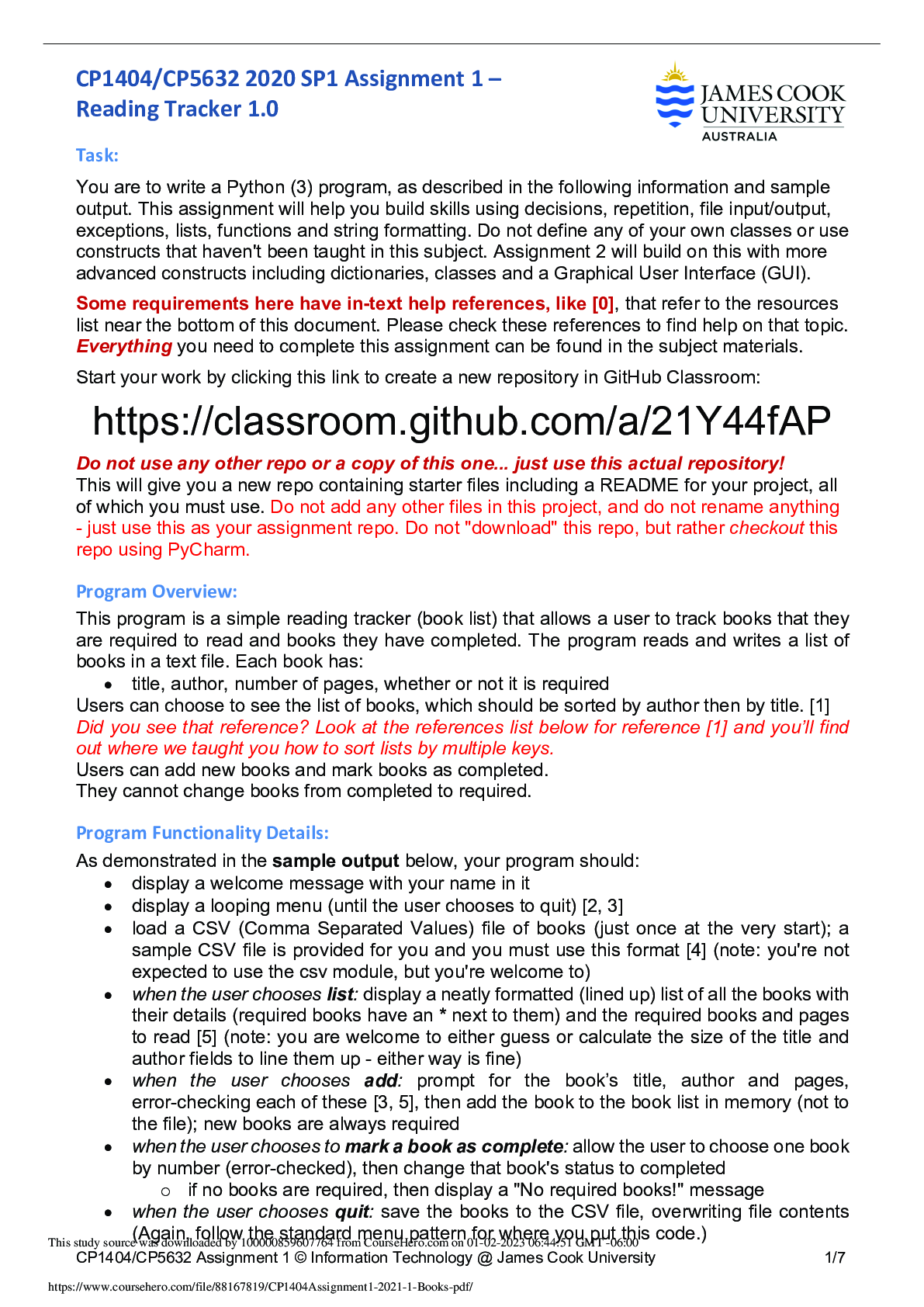
CP1404/CP5632 2020 SP1 Assignment 1 –
Reading Tracker 1.0
Task:
You are to write a Python (3) program, as described in the following information and sample
output. This assignment will help you build skills using decisions, repetition, file input/output,
exceptions, lists, functions and string formatting. Do not define any of your own classes or use
constructs that haven't been taught in this subject. Assignment 2 will build on this with more
advanced constructs including dictionaries, classes and a Graphical User Interface (GUI).
Some requirements here have in-text help references, like [0], that refer to the resources
list near the bottom of this document. Please check these references to find help on that topic.
Everything you need to complete this assignment can be found in the subject materials.
Start your work by clicking this link to create a new repository in GitHub Classroom:
https://classroom.github.com/a/21Y44fAP
Do not use any other repo or a copy of this one... just use this actual repository!
This will give you a new repo containing starter files including a README for your project, all
of which you must use. Do not add any other files in this project, and do not rename anything
- just use this as your assignment repo. Do not "download" this repo, but rather checkout this
repo using PyCharm.
Program Overview:
This program is a simple reading tracker (book list) that allows a user to track books that they
are required to read and books they have completed. The program reads and writes a list of
books in a text file. Each book has:
• title, author, number of pages, whether or not it is required
Users can choose to see the list of books, which should be sorted by author then by title. [1]
Did you see that reference? Look at the references list below for reference [1] and you’ll find
out where we taught you how to sort lists by multiple keys.
Users can add new books and mark books as completed.
They cannot change books from completed to required.
Program Functionality Details:
As demonstrated in the sample output below, your program should:
• display a welcome message with your name in it
• display a looping menu (until the user chooses to quit) [2, 3]
• load a CSV (Comma Separated Values) file of books (just once at the very start); a
sample CSV file is provided for you and you must use this format [4] (note: you're not
expected to use the csv module, but you're welcome to)
• when the user chooses list: display a neatly formatted (lined up) list of all the books with
their details (required books have an * next to them) and the required books and pages
to read [5] (note: you are welcome to either guess or calculate the size of the title and
author fields to line them up - either way is fine)
• when the user chooses add: prompt for the book’s title, author and pages,
error-checking each of these [3, 5], then add the book to the book list in memory (not to
the file); new books are always required
• when the user chooses to mark a book as complete: allow the user to choose one book
by number (error-checked), then change that book's status to completed
o if no books are required, then display a "No required books!" message
• when the user chooses quit: save the books to the CSV file, overwriting file contents
(Again, follow the standard menu pattern for where you put this code.)
CP1404/CP5632 Assignment 1
Coding Requirements and Suggestions:
• Work incrementally on this task: complete small parts of it at a time rather than trying to
get it all working at once.
• You are assessed on your use of version control including commits and good commit
messages, so please commit regularly (each logical chunk or milestone) and use
meaningful commit messages in the imperative voice, as taught in class [6]. Your
commit history should show steady work completed over reasonable time, not all in a
short period.
• Edit the module docstring at the very top of your assignment1.py file to contain your
own details.
• Make use of named constants as appropriate (e.g., for the characters that represent
the required or completed status).
• Use functions appropriately for each significant part of the program: this is the divideand-conquer problem-solving approach. Follow the principles you've learned about
functions, including the single responsibility principle (SRP).
• For efficiency, you should only load the books file once – when the program starts.
• Only save the books file once – when the user quits.
• Store the book data in a list of lists and pass this to any functions that need access
to it. Note: this variable should not be global. The only global variables you may have
are CONSTANTS. Do not store a book’s index – this is just its position in the list.
• The menu should handle both uppercase and lowercase letters as valid choices.
• Use exception handling as appropriate to deal with input errors (including when
entering numbers and selecting books) [3]. You should be able to use generic,
customisable functions to perform input with error checking (e.g., getting the title and
author can reuse the same function).
Check the rubric carefully to understand how you will be assessed. There should be no
surprises here – this is about following the best practices we have taught in class.
Output Requirements:
Sample output from the program is provided below. Ensure that your program matches
this, including spaces, spelling, and the formatting of the book list. Think of this as
helpful guidance as well as training you to pay attention to detail. The sample output is
intended to show a large (but not exhaustive) range of situations including user input error
handling.
Challenge:
For fun (but not extra marks), you may customise the farewell message with a random quote
about books. The one in the sample is taken from
https://www.goodreads.com/quotes/tag/books so your program could have a list of quotes
and then choose one randomly to display. This is the only part of the output that you should
be flexible with… the rest should match as closely as possible, as described above.
Submission:
Submit a zip file (not a rar or anything other than a zip) containing your project, including all
code (.py, .csv), your project reflection README, PyCharm project files and the .git directory.
That is, please just zip up your project directory. Do NOT include a venv. (If you have setup
your project correctly as instructed, you will not have a venv folder in it.) Name your zip file
like: FirstnameLastnameA1.zip. Upload your single zip file on LearnJCU under Assessment.
[Show More]





.png)