ACTIVITY 1
Introduction (Reviews and
Sentiment Value)
The persuasive power of words can be seen in a variety of places such as entertainment,
news, social media, and even reviews and comments. This activity focuses o
...
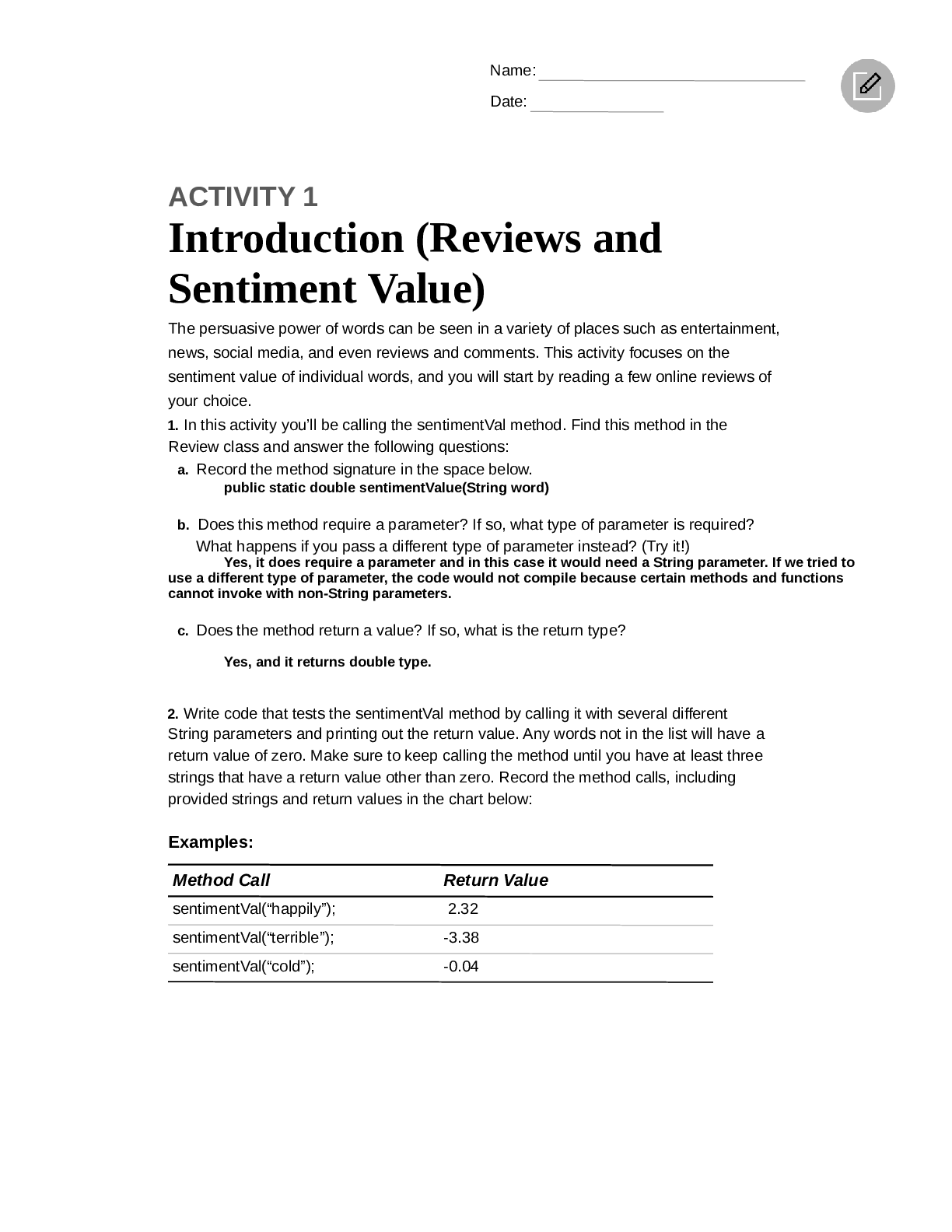
ACTIVITY 1
Introduction (Reviews and
Sentiment Value)
The persuasive power of words can be seen in a variety of places such as entertainment,
news, social media, and even reviews and comments. This activity focuses on the
sentiment value of individual words, and you will start by reading a few online reviews of
your choice.
1. In this activity you’ll be calling the sentimentVal method. Find this method in the
Review class and answer the following questions:
a. Record the method signature in the space below.
public static double sentimentValue(String word)
b. Does this method require a parameter? If so, what type of parameter is required?
What happens if you pass a different type of parameter instead? (Try it!)
Yes, it does require a parameter and in this case it would need a String parameter. If we tried to
use a different type of parameter, the code would not compile because certain methods and functions
cannot invoke with non-String parameters.
c. Does the method return a value? If so, what is the return type?
Yes, and it returns double type.
2. Write code that tests the sentimentVal method by calling it with several different
String parameters and printing out the return value. Any words not in the list will have a
return value of zero. Make sure to keep calling the method until you have at least three
strings that have a return value other than zero. Record the method calls, including
provided strings and return values in the chart below:
Examples:
Method Call Return Value
sentimentVal(“happily”); 2.32
sentimentVal(“terrible”); -3.38
sentimentVal(“cold”); -0.04Consumer Review Lab: Introduction (Reviews and Sentiment Value)
Method Call Return Value
sentimentVal(“ugly”); - 3.9
sentimentVal(“pretty”); 1.32
sentimentVal(“cold”); 1.59
Open up the cleanSentiment.csv file and look up a few of the words that were used
in the method call to verify the results.
Check Your Understanding
3. Determine whether or not each statement would compile. Briefly justify your
answers.
a. double num = sentimentVal(“warm”);
Yes, because this format follows the structure of the method and calls for the right type of argument type.
b. String word = sentimentVal(0.5);
No because the method only allows for a String argument not a double argument.
c. double x = sentimentVal(“good”, “bad”);
No because the method allows for only one argument (String) not (String, String).
2 AP Computer Science A Student Lab HandoutName:
Date:
ACTIVITY 2
Sentiment Value
and Star Ratings
Now that you have read several reviews and started exploring the sentimentVal
method, you will use this method to determine the overall sentiment of an entire review.
§ Pick a review of your choice. Copy and paste the content of the review into a new
text file that you create using a text editor, making sure to save the file with a
.txt extension.
§ If time permits, do this with multiple reviews. For testing purposes, you may also want
to create a SimpleReview.txt file like the following:
This was a terrible restaurant! The pizza crust was too chewy,
and I disliked the pasta. I would definitely not come back.
Tip
Strings are objects and have methods that can access information about
them and create new strings. The course framework describes those
methods which are part of the course, such as length, indexOf, and
substring.
In the Review.java file:
1. Write the following method that determines the sentiment value of a review. Utilize the
existing textToString method to complete the implementation of this method.
public static double totalSentiment(String fileName)
Tip
When calling the String methods within the framework, such as indexOf
and substring , adjustments must be made to account for strings being
indexed starting at zero.
2. Test the method by calling totalSentiment(“SimpleReview.txt”)and
printing the returned value.
AP Computer Science A Student Lab Handout 3Consumer Review Lab: Sentiment Value and Star Ratings
3. Write the following method that determines the star rating of a review.
public static int starRating(String fileName)
Tip
To provide instructions for the computer to process many different input
values, selection statements may need to be nested together to form more
than two branches and options. Pathways can be broken down into a series
of individual selection statements based on the conditions that need to be
checked and nesting together the conditions that should only be checked
when other conditions fail or succeed.
Sample code:
Method Call Return
totalSentimentVal(“26WestReview.txt”) 29.05
starRating(“26WestReview.txt”) 4
totalSentimentVal(“SimpleReview.txt”) -2.92
starRating(“SimpleReview.txt”) 1
Check Your Understanding
4. Explain how the totalSentiment method works, including how you’re using
strings and iteration in your solution.
[Show More]



![Preview of [eTextbook] [PDF] CompTIA Network+ Guide to Networks 9th edition By Jill West](https://browseimages.nyc3.digitaloceanspaces.com/paper-images/2025/Jan/18/o6ppor3h2025-01-18-02-55678b96c116501.png)









.png)