Computer Science  >  Summary  >  CIS 115 Week 1 iLab: Building a Registration Form and Pay Calculator in Python. (All)

CIS 115 Week 1 iLab: Building a Registration Form and Pay Calculator in Python.

Document Content and Description Below

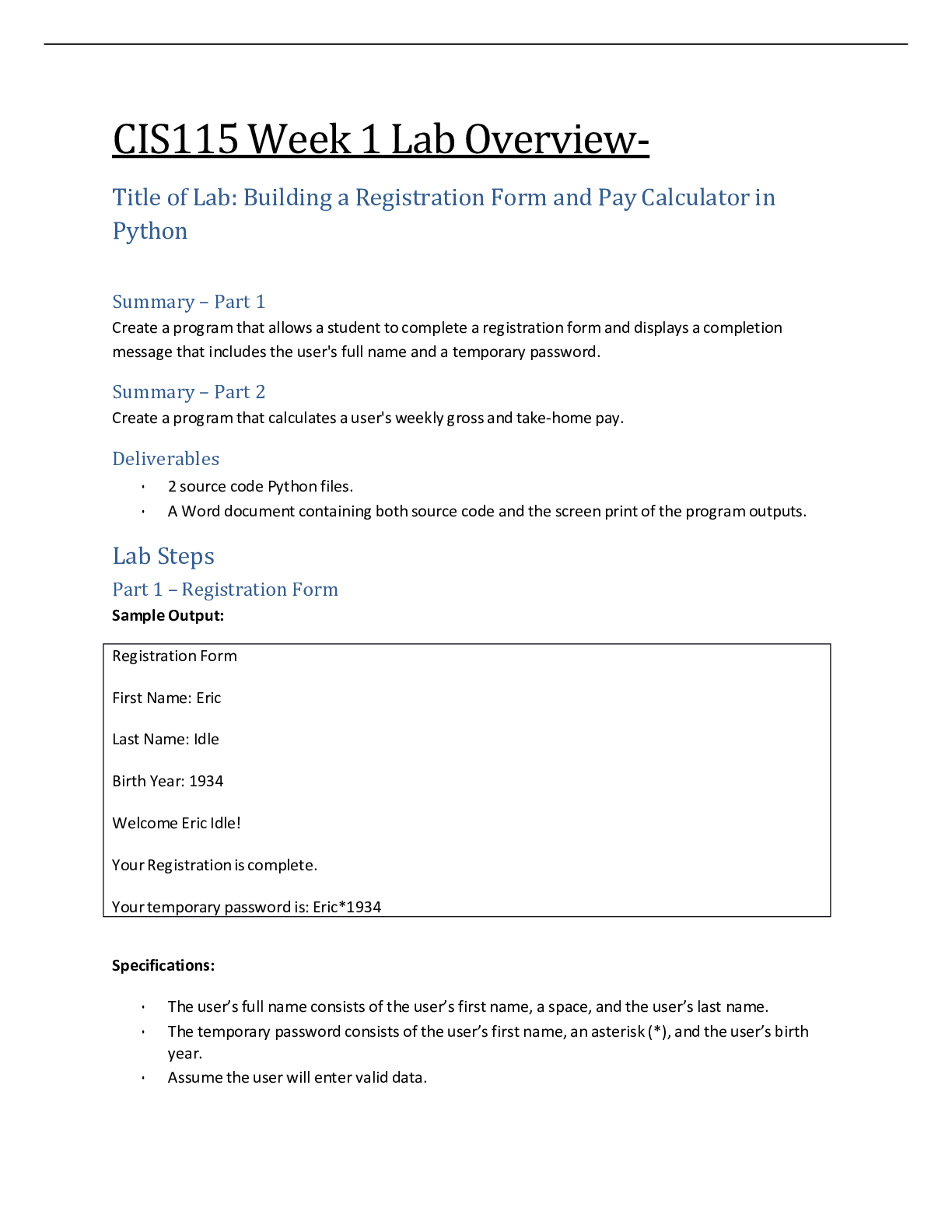
CIS115 Week 1 Lab Overview- Title of Lab: Building a Registration Form and Pay Calculator in Python Summary – Part 1 Create a program that allows a student to complete a registration form an ... d displays a completion message that includes the user's full name and a temporary password. Summary – Part 2 Create a program that calculates a user's weekly gross and take-home pay. Deliverables • 2 source code Python files. • A Word document containing both source code and the screen print of the program outputs. Lab Steps Part 1 – Registration Form Sample Output: Specifications: • The user’s full name consists of the user’s first name, a space, and the user’s last name. • The temporary password consists of the user’s first name, an asterisk (*), and the user’s birth year. • Assume the user will enter valid data. Pay Check Calculator Hours Worked: 35 Hourly Pay Rate: 14.50 Gross Pay: 507.5 Tax Rate: 18 Tax Amount: 91.35 Take Home Pay: 416.15 INPUT PROCESSING OUTPUT first_name last_name birth_year password=first_name + ”*” + str(birth_year) password • #!/usr/bin/env python3 # display a welcome message print("Registration Form") print() # get input from the user first_name = input("First name:\t") last_name = input("Last name:\t") birth_year = input("Birth year:\t") print() # create strings name = first_name + " " + last_name temp_password = first_name + "*" + birth_year # display the results print("Welcome " + name + "!") print("Yourregistration is complete.") print("Your temporary password is: " + temp_password) Part 2 – Pay Calculator Sample Output: • The formula for calculating gross pay is: o gross pay = hours worked * hourly rate • The formula for calculating tax amount is: o tax amount = gross pay * (tax rate / 100) • The formula for calculating take home pay is: o take home pay = gross pay - tax amount • The tax rate should be 18%, but the program should store the tax rate in a variable so that you can easily change the tax rate later, just by changing the value that's stored in the variable. • The program should accept decimal entries like 35.5 and 14.25. • Assume the user will enter valid data. • The program should round the results to a maximum of two decimal places. INPUT PROCESSING OUTPUT hours gross_pay = round(hours * pay_rate, 2) gross_pay pay_rate tax_rate = 18 tax_rate tax_amount = round(gross_pay * (tax_rate / tax_amount 100), 2) take_home_pay take_home_pay = round(gross_pay - tax_amount, 2) #!/usr/bin/env python3 # display a welcome message print("Pay Check Calculator") print() # get input from the user hours = float(input("Hours Worked:\t\t")) pay_rate = float(input("Hourly Pay Rate:\t")) print() # make calculations gross_pay = round(hours * pay_rate, 2) tax_rate = 18 tax_amount = round(gross_pay * (tax_rate / 100), 2) take_home_pay = round(gross_pay - tax_amount, 2) # display the results print("Gross Pay:\t\t", gross_pay) print("Tax Rate:\t\t",str(tax_rate) + "%") print("Tax Amount:\t\t", tax_amount) [Show More]

Last updated: 3 years ago

Preview 1 out of 4 pages

Buy Now

Instant download

We Accept:

Payment methods accepted on Scholarfriends (We Accept)
Preview image of CIS 115 Week 1 iLab: Building a Registration Form and Pay Calculator in Python. document

Buy this document to get the full access instantly

Instant Download Access after purchase

Buy Now

Instant download

We Accept:

Payment methods accepted on Scholarfriends (We Accept)

Reviews( 0 )

$8.00

Buy Now

We Accept:

Payment methods accepted on Scholarfriends (We Accept)

Instant download

Can't find what you want? Try our AI powered Search

267
0

Document information


Connected school, study & course


About the document


Uploaded On

Sep 24, 2021

Number of pages

4

Written in

All

Seller


Profile illustration for Nutmegs
Nutmegs

Member since 4 years

606 Documents Sold

Reviews Received
77
14
8
2
21
Additional information

This document has been written for:

Uploaded

Sep 24, 2021

Downloads

 0

Views

 267

Document Keyword Tags

Recommended For You

Get more on Summary »

$8.00
What is Scholarfriends

Scholarfriends.com Online Platform by Browsegrades Inc. 651N South Broad St, Middletown DE. United States.

We are here to help

We're available through e-mail, Twitter, Facebook, and live chat.
 FAQ
 Questions? Leave a message!

Follow us on
 Twitter

Copyright © Scholarfriends · High quality services·