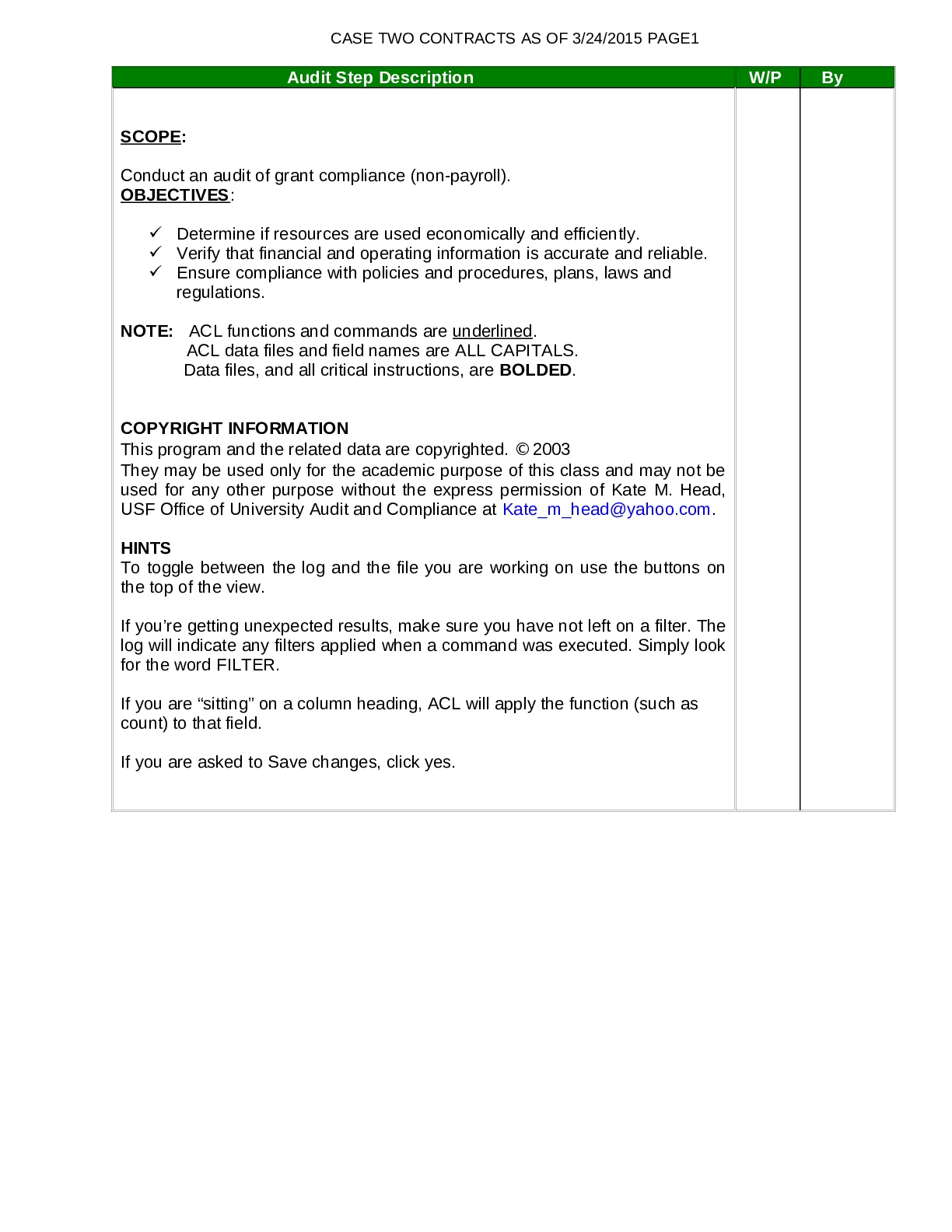
SCOPE:
Conduct an audit of grant compliance (non-payroll).
OBJECTIVES:
Determine if resources are used economically and efficiently.
Verify that financial and operating information is accurate and reliable.
En
...
SCOPE:
Conduct an audit of grant compliance (non-payroll).
OBJECTIVES:
Determine if resources are used economically and efficiently.
Verify that financial and operating information is accurate and reliable.
Ensure compliance with policies and procedures, plans, laws and
regulations.
NOTE: ACL functions and commands are underlined.
ACL data files and field names are ALL CAPITALS.
Data files, and all critical instructions, are BOLDED.
COPYRIGHT INFORMATION
This program and the related data are copyrighted. 2003
They may be used only for the academic purpose of this class and may not be
used for any other purpose without the express permission of Kate M. Head,
USF Office of University Audit and Compliance at
[email protected].
HINTS
To toggle between the log and the file you are working on use the buttons on
the top of the view.
If you’re getting unexpected results, make sure you have not left on a filter. The
log will indicate any filters applied when a command was executed. Simply look
for the word FILTER.
If you are “sitting” on a column heading, ACL will apply the function (such as
count) to that field.
If you are asked to Save changes, click yes.
CASE TWO CONTRACTS AS OF 3/24/2015 PAGE2
Audit Step Description W/P Hrs
A. ADMlNISTRATION
1. Obtain Data files.
In order to perform these tests, you will need access to the following files.
Your instructor will provide the location of these files. Do not attempt to save
these files on your disk or CD. Saving these files on your disk or CD will
cause critical failures to occur.
a) GR_AWARD_0405.DBF
b) GR_EXP_0405.DBF
A.Open a new project.
c) Open up the ACL program and Create a New Project.
d) Save in: rewriteable CD (D:\) or USB Flash Drive.
e) File Name: your first initial and last name (e.g., KHEAD)
f) The data definition wizard will automatically appear.
Note: Make sure you do not save your project on a computer in a computer
lab. You may not be able to complete the project later if you do not save it to
an external drive.
A.Import the databases into ACL.
g) GR_AWARD_0405
Click on Next, on the “Welcome to Data Definition Wizard” screen.
Select the Disk option, click on Next.
Locate the GR_AWARD_0405.dbf file by changing the Look in location at
the top of the screen. Click on the file name and the wizard will move
forward.
Click on Next, Next, Finish, OK. The GR_AWARD_0405 file will appear in
the ACL view. It is normal for the first column to be titled
RECORD_DELETED.
b) Open GR_EXP_0405.
Click on Data, External Data, Disk. Locate the GR_EXP_0405.dbf Click on
the file name and the wizard will move forward.
Click on Next, Next, Finish, OK. The GR_EXP_0405 file will appear in the
ACL view. It is normal for the first column to be titled RECORD_DELETED.
CASE TWO CONTRACTS AS OF 3/24/2015 PAGE3
Audit Step Description W/P Hrs
B. PERFORM DATA VALIDITY TESTS
To verify the completeness of the files, count the number of records, compare the
table layout definitions to the actual data using the verify command, and total the
field(s) used as check figures for each of the three files you imported into ACL.
This will ensure you brought in the data properly.
1. Open GR_AWARD_0405 by double clicking on the file name in the
Overview.
a) To count records: Click on Analyze, Count Records, OK. The number of
records will appear at the bottom of the view (110 records).
b) To verify records: Click on Data, Verify, Verify Fields, Add All, OK, OK.
The log will indicate “0 data validity errors detected”.
c) To total fields: Click on Analyze, Total Fields, Total Fields, AWARD_TOT,
OK. The total should be $12,010,696.
A.Open GR_EXP_0405.
d) To count records: Click on Analyze, Count Records, OK. The number of
records will appear at the bottom of the view (3,661 records).
e) To verify records: Click on Data, Verify, Verify Fields, Add All, OK, OK.
The log will indicate “0 data validity errors detected”.
f) To total fields: Click on Analyze, Total Fields, Total Fields, AMT. The total
should be $1,406,542.08.
NOTE: If you did not get the results expected, try importing the ACL files
again. From this point forward you are required to include all results from
your computer analyses (e.g., ACL tables and other ACL output) in your
solution to this assignment. You are also required to include your written
responses to questions.
A.GAIN KNOWLEDGE OF AUDITEE OPERATIONS
Familiarize yourself with the policies related to the area being audited.
Please review the materials located in Appendix A.












.png)
.png)

