WGU C724, Full Exam Coverage Top
exam Questions with accurate answers,
graded A+
Data - ✔✔-Symbols or signals that are input, stored, and processed by a computer for output as usable
information.
Hardware - ✔✔-th
...
WGU C724, Full Exam Coverage Top
exam Questions with accurate answers,
graded A+
Data - ✔✔-Symbols or signals that are input, stored, and processed by a computer for output as usable
information.
Hardware - ✔✔-the physical equipment and devices that make up a computer system and are
connected by networks. Includes input, output, and storage devices.
People - ✔✔-are the information system professionals and users who use computers
Software - ✔✔-Made up of programs and instructions to run your computer and network.
Network - ✔✔-a system of computers joined together so they can communicate and share resources.
Processes - ✔✔-Processes and procedures provide a structured sequence of activities to govern the use,
operation, and maintenance of IS.
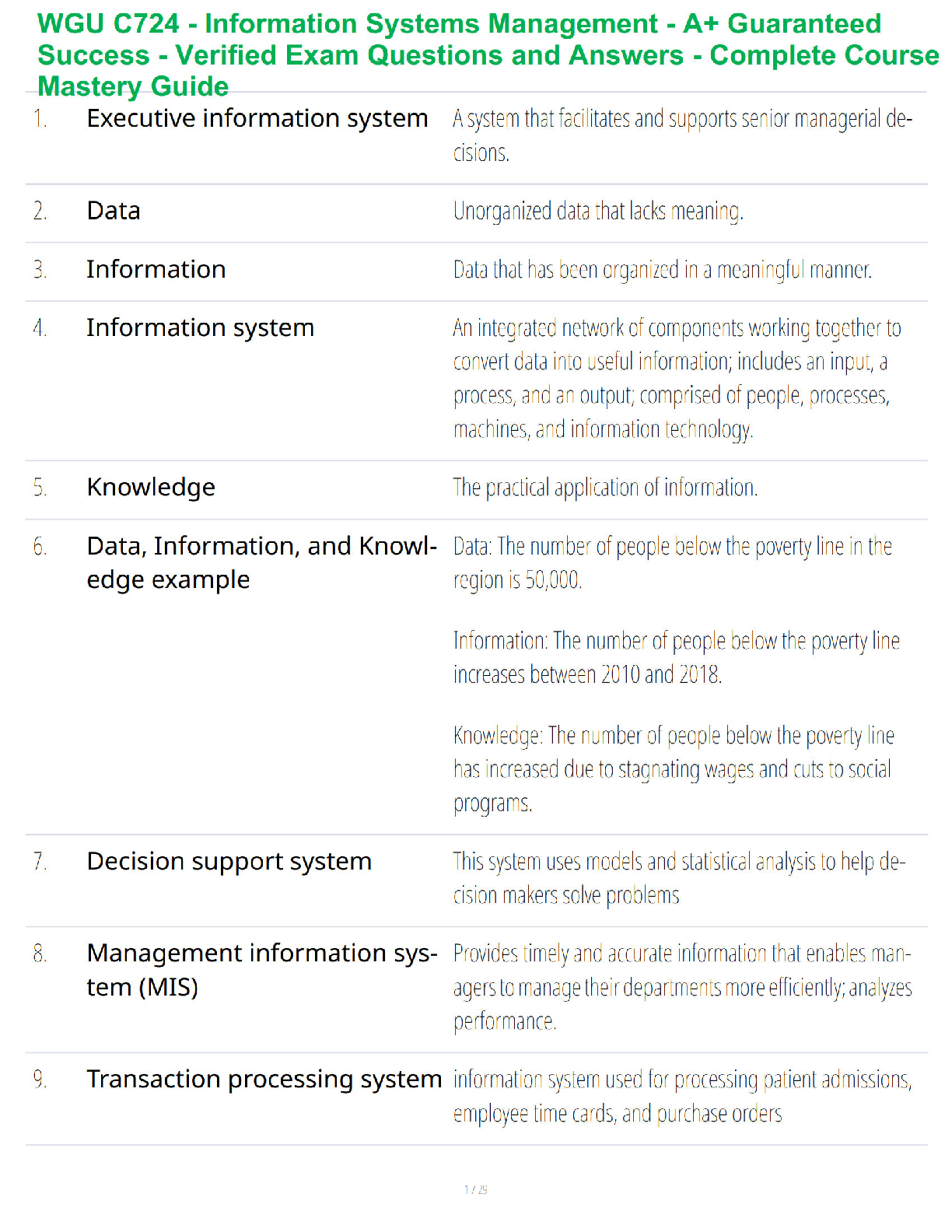
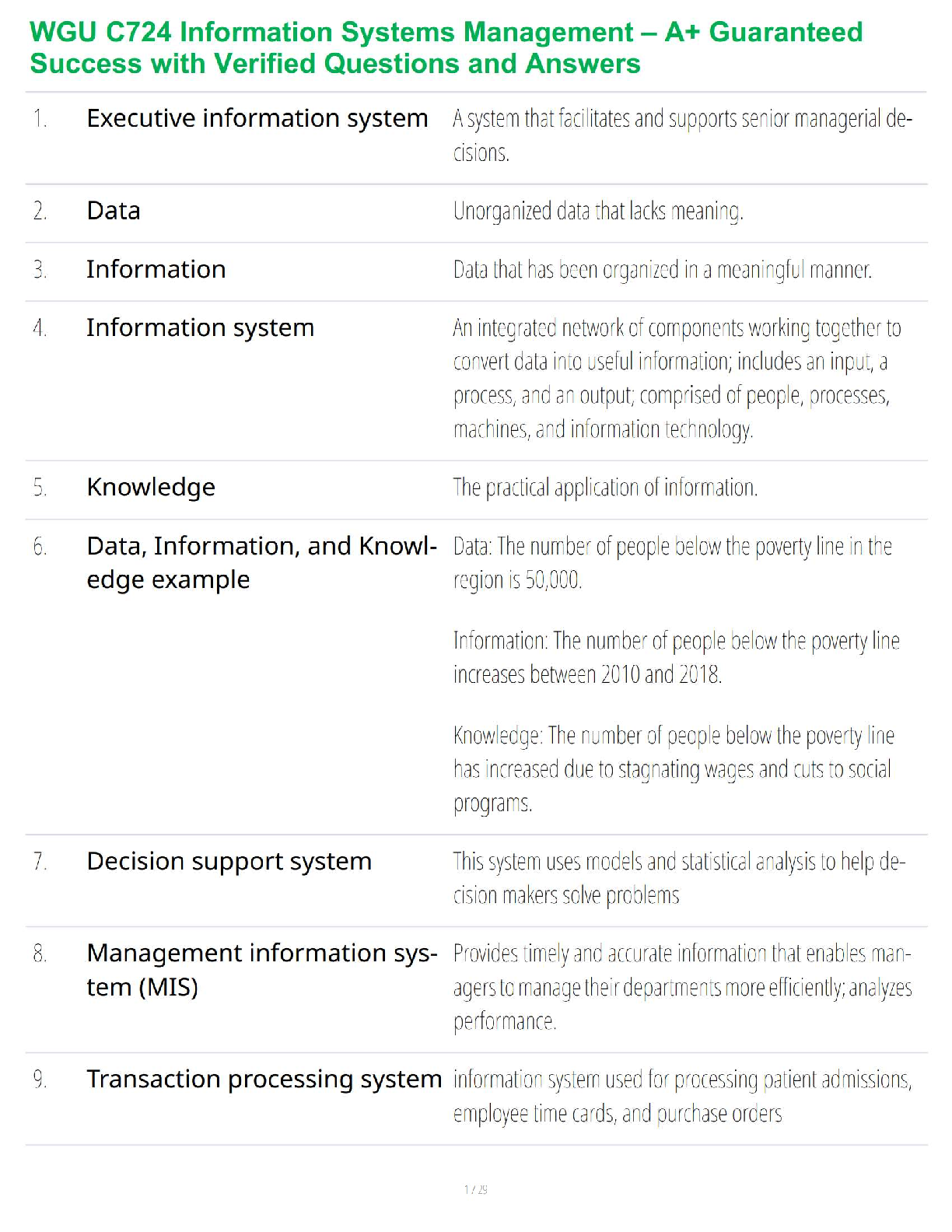
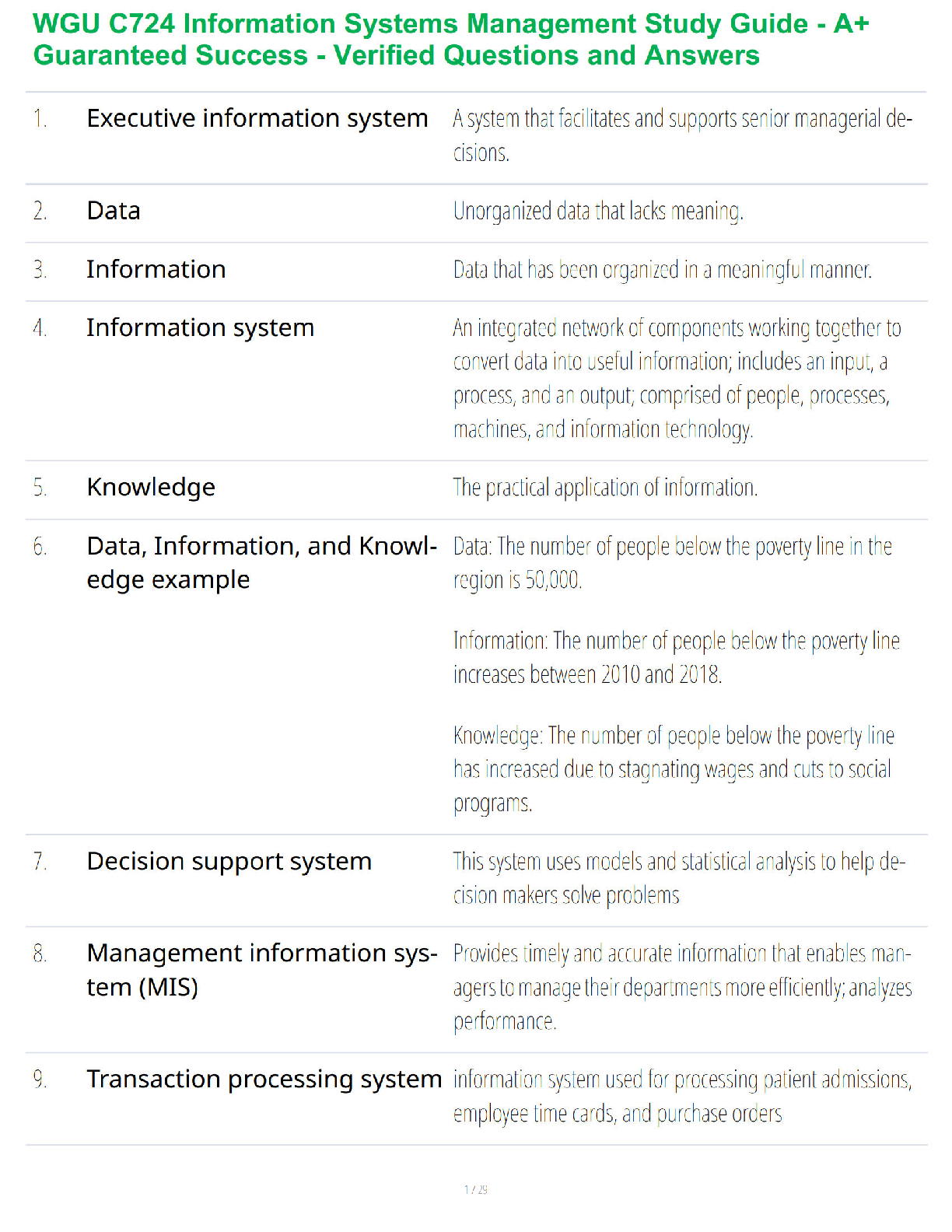
Executive Information System (EIS) - ✔✔-This system supports senior executives by providing important
data in the form of graphs and charts to analyze and identify long-term trends.
Decision-Support Systems (DSS) - ✔✔-focus on supporting all phases of specific decision-making
processes and procedures for arriving at a solution.
The Four Components of Decision-Support Systems (DSS) - ✔✔-data, model, knowledge, and user
interface management.
Management Information Systems (MIS) - ✔✔-represent a category of information systems that serve
low or first level managers and are usually focused on short- to medium-term business decisions.
The Five Components of Management Information Systems (MIS) - ✔✔-hardware, software, database,
network, and people.
Transaction processing systems (TPS) - ✔✔-collect, store, update, and retrieve transaction data within
an organization and is used by middle management.
Key Performance Indicators (KPI) - ✔✔-are used by executive and upper management to see how the
organization is performing in certain areas.
Executive Support Systems (ESS) - ✔✔-use internal and external data to help executives make
unstructured decisions.
The Four Components of the Executive Support Systems (ESS) - ✔✔-hardware, software, user interface,
and telecommunications.
Information Systems - ✔✔-an integrated network of components that provide managerial and
operational support to businesses by collecting and processing data into useful information as well as
providing for storage, retrieval, and security of data and the information it's transformed into.
Information Technology - ✔✔-refers to the hardware and software required to manage and deliver
information.
Information - ✔✔-is the meaningful organization of data so that statements can be made about them.
Major Reasons Firms Invest in Information Systems - ✔✔-1. achieve operational excellence
2. develop new products and services
3. attain customer intimacy and service
4. improve decision making
5. promote competitive advantage
6. ensure long-term survival
7. develop strong relationships with suppliers
An information system can provide solutions to problems and economic value to a business.
Information Management - ✔✔-is concerned with collecting, managing, manipulating, organizing and
reorganizing, and distributing information from a variety of sources to a variety of audiences in an
organization.
Data Cleansing - ✔✔-ensuring data accuracy and integrity by correcting inaccurate information and
deleting erroneous or duplicate data.
Information Technology Management - ✔✔-is concerned with the management of resources that
facilitate access to information.
Major Business Functions Provided by Information Systems - ✔✔-accounting and finance
Human Resources
Production and Operations
Sales and Marketing
Strategic Information Systems - ✔✔-provide tools used by an organization to accomplish specific tasks in
order to gain a competitive advantage in the marketplace.
Porter's 5 Forces Model - ✔✔-that helps companies develop competitive strategies using Information
Systems. Includes new entrants, substitute products or services, bargaining power of customers and
suppliers, and competitive rivalry.
Value Chain - ✔✔-a set of inputs used by a strategic information system and put into meaningful
outputs to help a company gain a competitive advantage in the marketplace
Network Economics - ✔✔-the cost of adding another business participant to a business venture is small,
the potential gain is great.
Virtual Company Model - ✔✔-Networks of people and resources join together to provide a service or
create a product without the traditional storefront boundaries.
Business Ecosystems - ✔✔-A network of businesses, such as suppliers and distributors, that are involved
in providing delivery of a service or product through cooperation.
Network-Based Strategies - ✔✔-create mutually beneficial partnerships between businesses.
Product Differentiation Strategy - ✔✔-this strategy can include offering a higher quality product or
service.
a) A core competency is an activity for which a business is a marketplace leader.
b) Synergy is the cooperation between several businesses to produce a better product or service than
would be possible if each business worked independently. Companies must clearly understand their
strengths and weaknesses and join forces with other companies to create positive synergy.
Growth Strategy - ✔✔-can include adding new products or new enhancements to existing products and
can also include acquisition, where one business purchases another.
Enterprise Resource Planning (ERP) - ✔✔-systems tightly integrate functional areas such as accounting,
finance, project management, inventory control, purchasing, human resources, customer retention,
sales, and marketing into one single, comprehensive IT system to allow for more focused system wide
decisions.
Customer Relationship Management (CRM) Systems - ✔✔-uses technology to merge marketing with
business processes to strengthen customer relationships and organize customer information (likes,
dislikes, and previous purchase history).
Supply Chain - ✔✔-is the sequence of processes involved in getting raw materials for a product all the
way to the production and distribution of a product into the hands of the customer.
Supply Chain Management (SCM) System - ✔✔-works to increase the efficiency of the process of getting
materials developed into the products and pushed out to the customer.
Knowledge Management Systems (KMS) - ✔✔-uses technology such as the Internet, collaboration
software tools, and databases, to facilitate the capturing of corporate data and helps companies deal
with personnel turnovers and rapid changes.
Chief Executive Officer (CEO) - ✔✔-is responsible for the success or failure of the company, creating the
company culture, and setting strategy and vision.
Chief Operating Officer (COO) - ✔✔-oversees the daily operations in a business and communicates the
organization's mission statement to employees.
Chief Financial Officer (CFO) - ✔✔-manages the company finances.
Chief Information Officer (CIO) - ✔✔-is the company's top technology leader and focuses on the people
and technology needed to run a company and serves as the technology infrastructure manager for the
company and oversees information systems matters.
Chief Technology Officer (CTO) - ✔✔-has the responsibility for implementing technology strategies.
Chief Security Officer (CSO) - ✔✔-is concerned with overall security functions for a business.
Network and Computer System Administrators - ✔✔-install and repair computer systems, as well as
identify and fix network issues.
Information Security Analysts - ✔✔-are responsible for the security of a company's network, data, and
information.
Database Administrators (DBA) - ✔✔-build databases to store data to meet business needs and are
responsible for all three functions including focusing on security and access requirements, designing,
and performing testing to ensure performance.
Database Technical Specialist - ✔✔-must know how to capture and use the company's data.
Web Developers - ✔✔-are responsible for creating and maintaining a company's website.
Computer Programmers - ✔✔-Someone who writes code to instruct computers to perform certain
tasks.
Software Engineer - ✔✔-is a higher level computer programmer. Someone in this position not only
writes the code but is responsible for designing a new application, developing specifications, overseeing
the implementation, and supporting users after implementation.
Computer Support Specialist - ✔✔-provides technical support to customers and employees through
direct interaction or telecommunications. The support could be through training or troubleshooting
technical issues.
Computer Systems Analyst - ✔✔-their job is to analyze a user's needs and determine the most efficient
and effective solution and they combine their business knowledge with technical expertise.
IT Managers, Project Managers, and Architects - ✔✔-organize, direct, coordinate, and plan IT-related
activities, people, and projects within an organization.
Internet of Things (IoT) - ✔✔-is the network of products (or things) that can be connected through the
internet, communicate with each other and with the environment, and transfer data over a network.
Platform as a Service (PaaS) - ✔✔-is the capability provided to the consumer to deploy onto the
infrastructure consumer-related or acquired applications created using programming languages,
libraries, services, and tools supported by the provider.
Infrastructure as a Service (IaaS) - ✔✔-is the capability provided to the consumer to provision
processing, storage, networks, and other fundamental computing resources.
Software as a Service (SaaS) - ✔✔-is the capability provided to the consumer to use the provider's
applications running on this kind of infrastructure.
Information Technology Infrastructure Library (ITIL) - ✔✔-is a common set of best practices widely used
by businesses to give guidance to companies on how to use IT as a tool for implementing change.
Agile Software Development Methodology - ✔✔-is an operational method by which software
developers iteratively gather requirements, plan, design, develop, test, and implement software.
Relationship with Business Strategy - ✔✔-The adoption or construction of an information system must
be aligned with the organization's goals.
Value Creation Through Technology Use - ✔✔-Today's computer technologies, such as wireless sensor
networks and cloud computing, allow organizations to create added value in nearly every industry and
profession. As a result, several industries have been created, along with many professions, jobs, and
fortunes. Technology tools have evolved over the years to create value for business by facilitating
calculations, documents creation, and graphs.
Political and Legal Pressures - ✔✔-response is to enact policies, complying to standards, and allying with
experienced partners.
Cultural Pressures - ✔✔-response is by using ethical business practices, building strong cultural ties with
stake holders, socially responsible, enacting sustainable business policies and practices.
Technological Pressures - ✔✔-response to these pressures by planning for improvements to reduce or
manage complexity, creating faster and more accurate models to make better decisions, and innovating
to sustain competitive advantages, to keep up with competitors, or to enter new markets.
Economic Pressures - ✔✔-response to these pressures by realizing the need to plan for or react to a
changing workforce, powerful suppliers, customers, and/or competitors.
Project Management - ✔✔-is the application of planning, organizing, time management, leadership,
communication, and problem-solving skills to accomplish an objective and deliverable on time and on
budget.
Major Components of a Project - ✔✔-Time, Scope, Resources (cost), and Quality
Risk Management - ✔✔-involves determining the vulnerability, assessing the impact that risk would
have if event occurred, evaluating cost/benefit analysis to avoid or transfer the risk, and implementing
the plan.
Analyze Risk - ✔✔-first determine the impact to the business should that risk occur and the likelihood
that this risk will actually occur.
Acceptance Testing Process - ✔✔-involves end user evaluation and review of the system in order to
demonstrate that the system is ready to be rolled out.
Risk Mitigation Planning - ✔✔-where these are planned to be avoided, reduced, accepted, or
transferred.
Strategies for Managing Project Risk - ✔✔-1. Risk Acceptance - Accepting that a risk will occur and doing
nothing to avoid or prevent it.
2. Risk Avoidance - Developing an alternative plan for achieving objectives by avoiding a specific risk or
risk category.
3. Risk Sharing - partnering with groups of individuals who have more experience and who will accept or
absorb some of all of the risk involved.
4. Risk Reduction - Acting to reduce the potential for a risk to occur or affect damage to the project.
5. Risk Transference - Shifting risk to another party.
Advantages and Disadvantages of Information Management - ✔✔-1. failures and problems can be
spotted before they become too expensive to handle
2. more information can be sorted, summarized, analyzed, and digested for decision making by fewer
people.
3. the use of accurate reports and analytical data, both time and money can be saved by better selecting
or reworking projects so that they have the best chance for success.
4. organizations must rely on experienced and expensive human and technological resources to create
them or on the companies that supply them.
5. integrations into the various sources of data, as well as the data themselves, must be accurate,
reliable, and be able to be maintained.
Advantages and Disadvantages of Information Technology Management - ✔✔-1. Brings order to chaos
by providing structure, standards, policies, and protocols.
2. an organization can do a better job at competing within its markets, and effectively communicating
with its stakeholders.
3. Once information technology (computers, peripherals, etc.) is implemented, support for these must
be managed to minimize the risk of failure or obsolescence and to ensure that they are being properly
used, managed, secured, and maintained by the people that know them.
Global Exporting - ✔✔-all services from the organization's home location means not changing the
centralized structure and requiring all but production to stem from the centralized domestic location,
including systems and data storage.
Multinational Organization - ✔✔-means that organizational divisions would be headquartered in
different locations, whether partially with an international organization or completely with a
transnational organization.
Multinational franchising, licensing, joint venture, or foreign direct investment, or similarly branded,
semi-independent organizations - ✔✔-are controlled locally but coordinated (perhaps loosely) through
the centralized organizations' structure. Information systems and data storage in this model is typically
decentralized at each foreign location, or at strategic location(s) in the local region.
Challenges to Global Information Systems - ✔✔-1. Laws that limit information transfer, including trans
border privacy and data transfer laws and other regulations.
2. Social and cultural norms.
3. Cultural particularism, which are societal norms instilled in populations that tie them emotionally to
local brands or habits.
In developing information systems, organizations generally accommodate non-domestic developers by
changing the structure of operations in these different ways - ✔✔-1. Decentralized development, where
developers in different locations develop their own solutions independently.
2. Duplicated systems development, where developers in the centralized location develop information
systems and tools, which are then intended to be operated on similar systems at each of the
international locations (Laudon & Laudon, 2012).
3. Networked development, where development and operations are planned, combined, and
coordinated between international locations
Global Information Systems Business Strategies - ✔✔-Is any information system which attempts to
deliver the totality of measurable data worldwide within a defined context.
ENIAC - ✔✔-30-ton 1,800 ft2 (sometimes called the "Great Brain"), the first general-purpose electronic,
digital computer used to calculate artillery ranges
UNIVAC - ✔✔-(room sized) and lighter (15-ton) derivative descendent of ENIAC, this is the first
commercially available mainframe
Evolution of Computers (Hardware) - ✔✔-The earliest commercially available electronic, digital
computer occupied a 20 foot by 40 foot room and consisted of 18,000 vacuum tubes. Vacuum tubes
were replaced by transistors that were replaced by integrated circuits.
a) First Generation: Vacuum tubes (1940 - 1956)
b) Second Generation Transistors (1956-1963)
c) Third Generation Integrated Circuits (1964 - 1971)
d) Fourth Generation: Microprocessor (1971-Present)
e) Fifth Generation: Artificial Intelligence (Present and Beyond) are bringing us capabilities such as voice
recognition
Floating Operations Per Second (FLOPS) - ✔✔-Computing power is increasing as clock speeds get faster
and more operations can be performed per second.
Evolution of Software - ✔✔-Before the late 1940s, reprogramming a computer with different
instructions consisted of changing manual switches (as in on or off switches), wiring, or using punched
cards to reconfigure mechanical components within them.
a) From the first numerically based computer languages, such as FORTRAN in the 1940s and 1950s.
FORTRAN stands for Formula Translation/Translator and is used for math, engineering, and scientific
calculations
b) English-like programming languages, such as COBOL in the 1960s. COBOL stands for Common
Business Oriented Language and was the first computer software language for business applications.
c) Java and C++ are examples of contemporary programming languages, with Java enabling online game
development.
d) Integrated Development Environment (IDE) is a programming environment that provides tools, like
compilers and debuggers, for developers to write code.
e) Pseudocode is an informal high-level description of the operating principle of a computer program or
other algorithm. It uses the structural conventions of a normal programming language, but is intended
for human reading rather than machine reading. Pseudocode typically omits details that are essential for
machine understanding of the algorithm, such as variable declarations, system-specific code and some
subroutines.
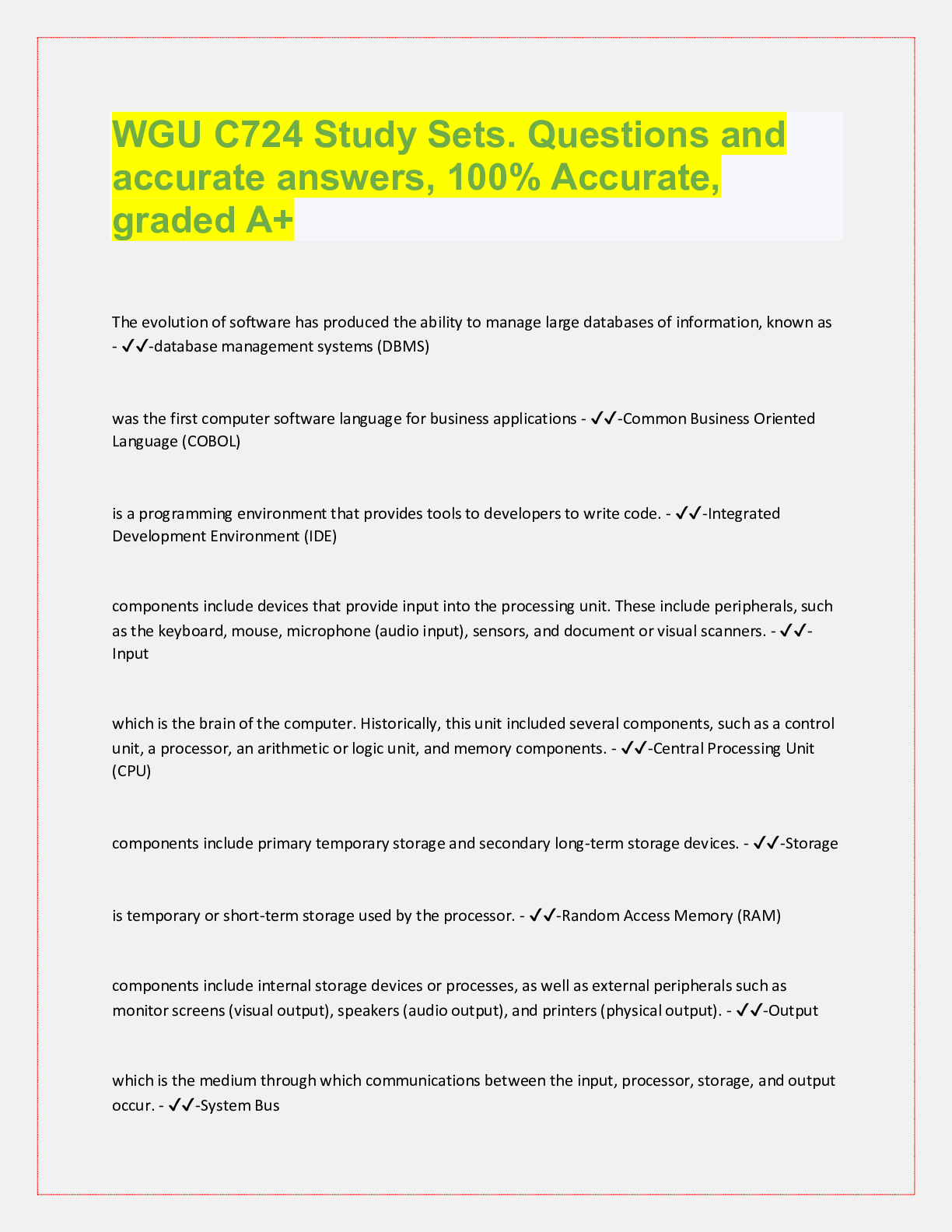
Input Components - ✔✔-include devices that provide input into the processing unit. These include
peripherals, such as the keyboard, mouse, microphone (audio input), sensors, and document or visual
scanners.
Processing Components - ✔✔-include the central processing unit (CPU), which is the brain of the
computer. Historically this unit included several components, such as a control unit, a processor, an
arithmetic or logic unit, and memory components. Modern CPUs have merged these components into
an integrated design. Today, multiple-core processors can be used in tandem for a single computer,
tablet, or smartphone. Supercomputers exist today that have the equivalent of millions of processors.
Storage Components - ✔✔-include primary temporary storage and secondary long-term storage
devices. Random access memory (RAM) is temporary or short-term storage used by the processor. A
hard drive is long-term storage that acts as a reserve aide for short-term storage or to store output data.
Other storage includes peripheral devices such as external hard drives and removable media (floppy
disks, optical discs, and flash drives).
Output Components - ✔✔-include internal storage devices or processes, as well as external peripherals
such as monitor screens (visual output), speakers (audio output), and printers (physical output).
System Bus - ✔✔-which is the medium through which communications between the input, processor,
storage, and output occur.
Motherboard - ✔✔-is the device that contains the system bus and connects the various input and
output devices that compose any given computer system.
Network Interface Cards - ✔✔-allow computers to connect to networks.
Server - ✔✔-manages network resources and services
Handheld Scanner - ✔✔-is one that is moved by hand over the material being captured (barcode
scanner).
Input Devices - ✔✔-included now-archaic punch cards or magnetic readers and contemporary input,
such as analog audio (e.g., voice recognition), keyboard input, touch sensitive screens, biometric
scanners (e.g., fingerprint, hand, or eye scanners), motion detection, optical character recognition (OCR)
(e.g., from a document scanner), and image capture (e.g. from cameras or other imaging equipment).
Output Devices - ✔✔-includes document printers, audio output devices (i.e., speakers), visual output
(e.g., monitors and televisions), and computer-aided design equipment.
Central Processing Unit (CPU) - ✔✔-contains the circuitry necessary to interpret and execute program
instructions that allow a computer to function.
Primary Storage - ✔✔-are typically referred to as volatile flash memory, meaning that information
storage is temporary and can only be stored until power is removed. Includes RAM, Cache Memory, and
ROM, that is directly accessible to the CPU.
DRAM - ✔✔-the most common type of RAM and is used as system memory, when large amounts of
RAM are needed.
SRAM - ✔✔-is used as cache memory, to access the most frequently used instructions and data more
quickly.
Secondary Storage - ✔✔-is accessed only through a sys
[Show More]


.png)

.png)

.png)

.png)
.png)